AI Content Generation Roadmap for Students: From Ideas to Reviewed.
An AI content generation roadmap should teach students to move from idea to reviewed draft in a controlled workflow: define the assignment, gather evidence, prompt for a narrow.

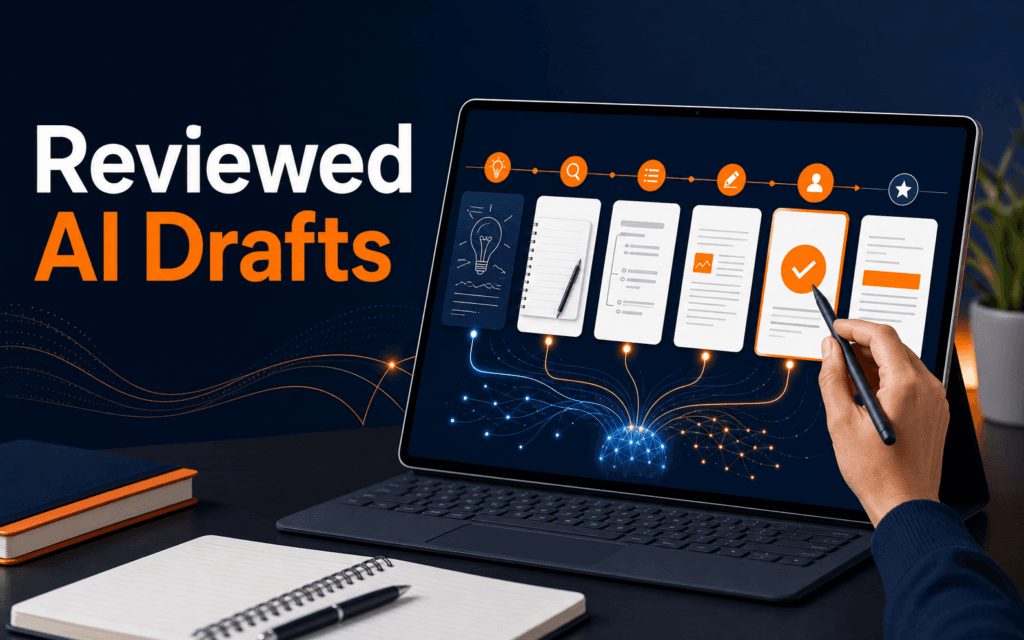
An AI content generation roadmap should teach students to move from idea to reviewed draft in a controlled workflow: define the assignment, gather evidence, prompt for a narrow output, check the result, revise it with human judgement, and only then prepare it for submission or publishing.
Generative AI can produce fluent text, but fluency is not proof of accuracy. OpenAI’s text generation and prompt engineering guidance supports clear tasks, context, constraints, and review, while UNESCO’s generative AI education guidance frames student use around human-centred, critical, safe, and creative practice. This roadmap fits beginner content work and connects naturally with Rising Edge AI Content Generation and Graphic Design.
The Real Outcome: A Reviewed Draft, Not Instant Content
The clearest goal is a reviewed draft that can survive a human quality check. A reviewed draft has a defined purpose, a known audience, cited or verified support where needed, consistent structure, and a visible editing pass. It should sound like the student understands the topic, not like a generic answer has been pasted into a document.
A simple example makes the difference clear. Suppose a student needs a blog post about healthy study habits. A weak AI workflow is: “Write a blog post about study habits,” then publish whatever appears. A stronger workflow is: define the reader as first-year college students, list the required points, collect reliable notes, ask AI for an outline, improve that outline, draft one section at a time, verify any claims, and edit the final piece for voice and clarity. The second workflow takes longer, but it teaches the student how content is built.
A reviewed draft also protects the student from common risks. AI-generated text may sound confident while missing context, mixing up terms, or giving advice that does not fit the assignment. For creative work, it can produce bland paragraphs that feel acceptable at first but do not show insight. For academic or professional work, it can create a bigger problem if the student cannot explain the final answer. The roadmap therefore starts with responsibility before it reaches production speed.
Use this quick test before calling a draft ready:
- Explain the main argument without reading the AI output.
- Confirm that important claims are supported by a source, class material, or your own analysis.
- Show where you changed the structure or wording after reviewing it.
- Check that the final piece fits the audience and platform.
- Follow your teacher, client, or organization’s rules for AI use.
If the answer to any of these is no, the draft is still in progress.
The Core Concepts Students Should Learn First
Before choosing tools or prompts, students need to understand five basic ideas: intent, context, evidence, constraints, and review.
Intent is the job the content must perform. A class explanation, a LinkedIn post, a product description, and a landing page section are not the same task. They may use the same topic, but they need different structure and tone. Students should begin by writing one sentence that says what the content should help the reader do. For example: “Help beginners understand how to create a simple budget without confusing financial terms.”
Context is the information AI needs to stay useful. This includes the audience, level, format, length, key points, sources, and any style requirements. Prompt engineering is partly the habit of giving the model enough context to produce an output that matches the task. A vague prompt produces a vague draft because the model has to guess the missing requirements.
Evidence is the support behind the content. In an educational article, evidence may come from class notes, official documentation, research reports, interviews, or practical examples. AI can help organize and summarize evidence, but students should not assume the model has verified the latest facts. When a point matters, verify it against a trusted source.
Constraints are the boundaries. They tell the model what not to do, which format to follow, which tone to use, which sections to include, and which claims to avoid. Constraints are useful because they turn AI from a broad text generator into a more focused assistant.
Review is the student’s responsibility. UNESCO’s education guidance frames AI use around human-centred values and capacity building. That means the student must still make decisions, catch errors, and understand the final work. Review is not a final spellcheck. It is the moment where the student checks whether the draft is true, useful, fair, clear, and appropriate to submit.
A Practical AI Content Generation Roadmap
Here is a workflow students can use for most content assignments.
1. Define the task in one brief
Start with a small content brief before opening an AI tool. Include the topic, reader, purpose, format, length, required points, source requirements, and deadline. A good brief might say:
“Write an educational blog draft for beginner design students. Topic: why contrast matters in web design. Audience: students who know basic HTML and CSS. Purpose: explain contrast with practical examples. Length: 1,200 to 1,500 words. Include sections on visual hierarchy, readability, accessibility, and common mistakes. Use a clear, practical tone.”
This brief helps the student think before generating. It also becomes the base prompt.
2. Gather notes before drafting
Students often jump straight to generation because it feels efficient. The better move is to collect raw material first. For a class assignment, that might include lecture notes, textbook points, official documentation, or a teacher’s rubric. For a blog post, it might include product details, audience questions, and links to trusted references.
Use AI at this stage for organization, not replacement. Ask it to turn your notes into themes, suggest missing questions, or identify where the outline is weak. Do not ask it to invent research. If a claim is important, keep the source beside it.
3. Ask for an outline, then edit it manually
The first useful AI output is usually an outline. Ask for sections with the purpose of each section, not only headings. For example: “Create an outline for this article. For each section, explain what reader question it answers and what evidence it needs.”
Then review the outline like an editor. Remove generic sections, merge repeated points, and add missing practical examples. This is where the student begins to shape the work. If the outline looks like every other article on the internet, it needs a stronger angle.
4. Draft one section at a time
Long one-shot prompts often produce uneven articles. Drafting one section at a time gives better control. Provide the section purpose, notes, style requirements, and any source material. Ask for a clear explanation with examples, but keep the output narrow.
After each section, review it immediately. Check whether it answers the section question. Highlight unsupported claims. Rewrite sentences that sound too broad. Add your own examples from class, projects, or local context. This keeps the article from becoming a polished but shallow block of text.
5. Verify facts and sensitive claims
Any claim about current tools, policies, prices, legal rules, health advice, statistics, or official requirements needs verification. Even stable concepts should be checked when the assignment requires accuracy. Use official documentation, trusted institutions, and the teacher’s requirements as the source of truth.
For AI-related work, tool features and platform policies can change. A student writing about a software feature should check the official help page before submitting. A student writing about education policy should use the institution’s rules, not a general model answer.
6. Revise for structure and voice
Once the full draft exists, step away from generation and become the editor. Read the article from the reader’s point of view. Check whether the opening answers the question quickly, the sections move in a logical order, examples are concrete, repeated ideas are removed, and impressive-sounding but empty sentences are cut.
This is also the point to bring the writing back into the student’s voice. Replace generic phrases with precise wording. Add transitions where the logic jumps. Cut filler. Keep useful explanations. A strong AI-assisted draft should become more human after revision, not less.
7. Prepare the final format
The final step depends on the output. A blog post needs headings, metadata, internal links, and a featured image brief. A social post needs a shorter hook, line breaks, and a platform-specific call to action. A presentation needs slide titles and speaker notes. A design project may need the text adapted for visual hierarchy.
This is where content generation connects with graphic design. A strong piece of writing still needs layout decisions when it becomes a poster, carousel, web page, or hero section. Students who understand both content and design can make the message clearer instead of simply decorating it.
Common Mistakes and How to Avoid Them
The first mistake is using AI before understanding the assignment. If the student cannot explain the expected outcome, the prompt will be weak. Start with the rubric or brief.
The second mistake is asking for a complete article too early. This often creates generic structure, repeated ideas, and unsupported claims. Use AI for planning, section drafting, and revision support instead.
The third mistake is leaving no evidence trail. Students should know which points came from class notes, which came from official sources, and which are their own examples. This matters for trust and for learning.
The fourth mistake is ignoring rules for AI use. Some teachers allow AI for brainstorming but not final writing. Some clients allow AI assistance if reviewed. Some organizations require disclosure. The safest habit is to check the rule before starting and keep a short record of how AI was used.
The fifth mistake is accepting a polished tone as proof of quality. Good writing is not only smooth. It is specific, accurate, organized, and appropriate for the reader.
How to Review an AI-Assisted Draft
Use a review pass with separate checks instead of trying to fix everything at once.
First, check meaning. Each section should answer a real question and support a clear argument or learning path. Remove anything that does not help.
Second, check evidence. Mark every factual claim that needs support. Verify tool features, dates, policies, and educational claims. Add links only where they help the reader understand or verify a point.
Third, check originality. Add your own examples, comparisons, or project decisions. The article should show judgement, not only summary.
Fourth, check readability. Shorten overloaded sentences. Break long paragraphs. Replace vague phrases with concrete terms. Read the opening and ending out loud to see whether they sound natural.
Fifth, check formatting. Headings should guide the reader. Lists should be useful, not decorative. Any table should compare real decisions. Links should use descriptive anchor text.
Students who want to turn this review workflow into repeatable practical work can compare it with the Artificial Intelligence (AI) program. The useful question is whether the learning path requires source checking, revision evidence, and responsible output rather than prompt submission alone.
Prospective students in Gujrat, Punjab, Pakistan can take this checklist into a conversation about the Artificial Intelligence (AI). It creates specific questions about practice, feedback, testing, and project completion while avoiding assumptions about a particular batch.
FAQ
How does an AI content generation roadmap work?
It works by separating content creation into controlled stages: brief, research, outline, section draft, fact check, revision, and final formatting. The student uses AI where it helps, but keeps human judgement in charge of accuracy, originality, and publishing readiness.
Can students use AI without weakening their writing skills?
Yes, if they use AI as a coach and drafting assistant instead of a replacement for thinking. The student should still decide the angle, verify claims, rewrite weak sections, and understand the final answer.
What should students learn after basic AI content generation?
After the basics, students should learn prompt engineering, editing, content strategy, visual communication, and ethical review. Those skills turn simple generation into a professional workflow.
Next Step
Choose one small assignment and run it through the full roadmap: brief, notes, outline, section draft, verification, revision, and final format. Keep the first attempt simple. The goal is not to generate more words. The goal is to build a repeatable process that helps you create content you can explain, defend, and improve.
Want to Build Practical Technology Skills?
Explore RisingEdge courses designed to help students learn real skills, build projects, and prepare for career opportunities.