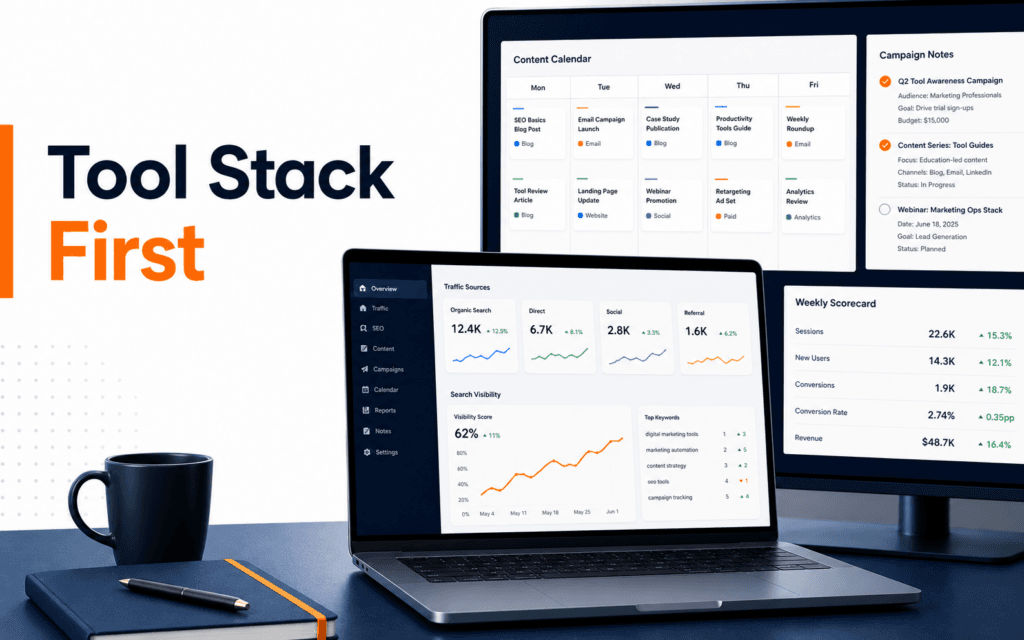
Content Calendar Workflow: Plan Topics, Channels, Tracking
A content calendar workflow should connect topics, channels, deadlines, links, and reporting in one practical system. The useful order is to choose the reader problem, map the.


A content calendar workflow should connect topics, channels, deadlines, links, and reporting in one practical system. The useful order is to choose the reader problem, map the content format, assign the channel, prepare the landing page or destination, build tracking links, publish on schedule, and review performance against the original goal. Use this workflow to diagnose and resolve the problem when a team publishes regularly but cannot explain what the content is supposed to achieve.
A calendar is not only a list of dates. It is a decision tool. It should show what is being published, why it matters, where it will appear, who owns it, which link will be used, and how results will be checked later.
Start With The Reader Problem
Every useful content item should answer a reader problem. A blog post may teach a skill. A social post may introduce an offer. An email may move a student toward admissions. A video may explain a common mistake. If the problem is unclear, the calendar becomes busy but unfocused.
Write one sentence for each planned item: this content helps this audience solve this problem by doing this action. That sentence is more useful than a vague topic name. It keeps the team from filling the calendar with random posts that do not support a learning path or campaign.
For Rising Edge, a topic might support beginners comparing courses, students learning a skill, or working professionals improving a workflow. The Digital Marketing course is relevant because content planning is most useful when it supports a measurable campaign or audience decision.
Choose Format And Channel Together
A content idea changes depending on format. A checklist works well for a blog post, carousel, downloadable sheet, or short video. A comparison may work better as a blog article and email. A reminder may work best on social or WhatsApp. Choose the format and channel together.
Do not force every idea into every channel. Repurposing is useful, but each channel has a different job. A search-focused article needs enough depth for a reader who is actively looking for an answer. A social post needs a clear hook and one action. An email needs a specific audience and next step.
The calendar should include format, channel, owner, draft date, review date, publish date, destination URL, tracking link, status, and performance note. This is enough for most small teams. More columns are optional only if they improve decisions.
Prepare The Destination Before Publishing
Content often fails because the destination is weak. A social post may send people to a page that does not match the promise. An email may promote a course but link to a page without the expected details. A blog post may mention admissions but not guide the reader naturally.
Before publishing, open the destination page and check whether it answers the next question. If the post says learn WordPress basics, the page should support that intent. If the campaign asks for enquiries, the form or contact option should be easy to find.
This is where content planning connects with SEO. The SEO course helps students understand search intent, internal links, page structure, and measurement. A content calendar should support the site structure instead of creating isolated posts.
Build Tracking Links Correctly
Google Analytics documentation explains that campaign URL parameters help identify campaigns that refer traffic in reports. That means tracking should be part of the calendar before publishing, not something added after results look confusing.
Use consistent source, medium, and campaign names. A newsletter link, Instagram post, partner link, and QR code should each be labeled clearly. If one person uses instagram and another uses ig, reports may split traffic. If one email uses newsletter and another uses email, the weekly review becomes harder.
Keep the approved tracking URL inside the calendar. Do not let team members create separate links casually. One source of truth prevents messy data.
Also test each link. Open it before publishing, confirm it reaches the right page, and check that the UTM parameters are not broken by redirects or copy mistakes. A simple prelaunch test prevents a week of unreliable reporting.
Review Analytics And Search Together
Google Analytics traffic acquisition reporting helps analyze session source and medium. Use it to see which campaign links and channels brought visits. Search Console Performance reporting shows search visibility signals such as queries and pages. Use both when the content has a search component.
Do not judge content only by total traffic. Compare the goal with the result. If the goal was enquiries, look at enquiry actions. If the goal was awareness, sessions and engagement may be useful. If the goal was search growth, impressions, queries, and landing pages deserve attention.
Add one review note per content item. The note should say keep, improve, repurpose, update, or stop. Without a decision, reporting becomes a ritual rather than a management tool.
Add Quality Control To The Calendar
A calendar should include review status, not only publish status. Check topic fit, source support, internal links, call to action, featured image, spelling, mobile view, and tracking link. If AI helped draft the content, add a human review step before approval.
Google helpful-content guidance focuses on useful, reliable, people-first content. That standard is a good reminder for calendar planning. Publishing more often is not useful if each item is thin, repeated, or disconnected from reader needs.
The AI Content Generation course connects naturally here because AI-assisted content still needs briefing, review, editing, and publishing judgment.
Weekly Calendar Review
At the end of each week, review what was planned, what was published, what slipped, what performed, and what should change. Keep the review short. The goal is not to create a large report. The goal is to improve next week’s decisions.
A practical weekly review includes five questions: which content supported the goal, which channel created useful action, which destination page needs improvement, which topic should be updated or expanded, and which task blocked publishing. Answering those questions keeps the calendar operational.
Final Content Calendar Checklist
Before the week begins, confirm topics, reader problems, formats, channels, owners, draft dates, review dates, publish dates, destination URLs, tracking links, and success signals. Before publishing, test links and destination pages. After publishing, review Analytics and Search Console against the original goal.
A good content calendar does not make marketing busier. It makes marketing easier to understand. It connects planning, publishing, and reporting so the team can improve with evidence.
For teams, add a simple approval lane. Draft, review, approved, scheduled, published, and reviewed are enough for most workflows. The status should show where work is stuck. If many items stay in review, the team may need clearer briefs or fewer planned posts. If many items publish without review, quality risk is increasing.
The calendar should also protect old content. Add a column for update opportunities. A strong older article can support a new campaign if it is refreshed, internally linked, and promoted again. This is often more useful than creating a new post for every idea.
Finally, keep campaign and evergreen content separate. Campaign content has a short time window and a clear offer. Evergreen content supports long-term discovery and learning. Both can appear in one calendar, but they should not be judged by the same short-term signals.
For beginners, start with a two-week calendar before building a full quarterly plan. Two weeks is enough to practice briefing, drafting, reviewing, scheduling, publishing, tracking, and reporting. Once the workflow is stable, expand the planning window.
Use one source of truth. If dates live in one spreadsheet, drafts in another document, and tracking links in a chat thread, the team will lose context. A simple shared calendar or project board can prevent missed reviews and duplicate work.
Common Content Calendar Mistakes
The first mistake is planning topics without owners. A topic with no owner usually becomes late or rushed.
The second mistake is planning dates without review time. Content needs enough time for source checks, link checks, image review, and final approval.
The third mistake is tracking only published items. The team also needs to know which ideas were postponed, merged, or removed.
The fourth mistake is never reviewing results. A calendar that does not learn from performance becomes a schedule, not a marketing workflow.
The fifth mistake is ignoring dependencies. A post may need a landing page edit, design asset, approval, tracking link, or email segment before it can publish. Put dependencies in the calendar so the deadline reflects real work instead of wishful planning.
For a learner comparing classroom training in Gujrat, Punjab, Pakistan, this workflow turns interest in the Digital Marketing into concrete evaluation criteria. It clarifies which decisions and checks should appear in credible practical work.
FAQ
What should a content calendar include?
A practical calendar should include topic, audience, format, channel, owner, review date, publish date, destination URL, tracking link, status, and performance note.
Do small teams need UTM links?
Yes, when they want to compare campaigns or channels. UTM links help reports show where campaign traffic came from.
How often should a content calendar be reviewed?
Review it weekly for active campaigns. A short review is enough if it leads to a decision about what to keep, improve, repurpose, or stop.
Want to Build Practical Technology Skills?
Explore RisingEdge courses designed to help students learn real skills, build projects, and prepare for career opportunities.