Compare Frontend, Backend, and Full-Stack Starter Projects
Frontend, backend, and full-stack starter projects teach different boundaries. A frontend project emphasizes browser structure, interaction, accessibility, and responsive behavior.

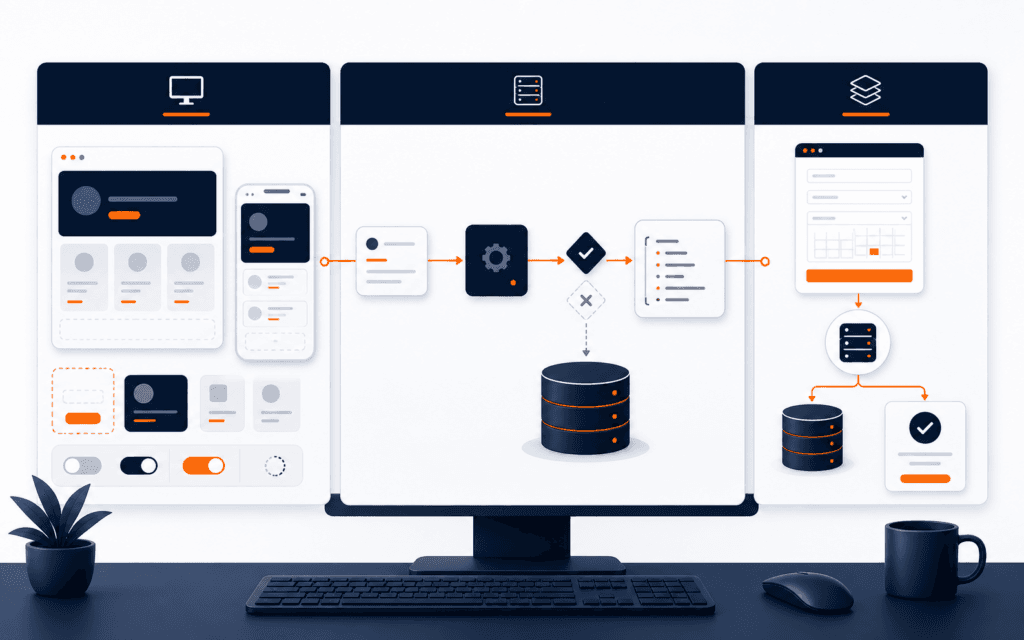
Frontend, backend, and full-stack starter projects teach different boundaries. A frontend project emphasizes browser structure, interaction, accessibility, and responsive behavior. A backend project emphasizes requests, data, rules, errors, and authorization. A full-stack project connects both sides and adds integration and deployment cost.
Choose the smallest project whose evidence matches the questions you want to answer. Use the shared scorecard to make a justified choice based on the boundary you want to test, the evidence you can produce, and the scope you can finish. None of the three labels is automatically easier, better paid, or more future-proof.
Use One Comparison Scorecard
Compare every option by the same criteria: user outcome, main technical boundary, prerequisites, deliverables, normal and failure tests, deployment, documentation, and likely completion time. This prevents a polished frontend screenshot from being compared unfairly with an invisible backend service or a much larger full-stack system.
Score the learning question too. If you want to test whether you enjoy interface detail, choose work with responsive and accessibility decisions. If you want to test data and rules, choose an API. If you want to understand integration, accept the extra coordination of a narrow end-to-end workflow.
Understand The Client Server Boundary
MDN’s client-server overview explains that browsers send HTTP requests and servers process them, often using data before returning a response. Frontend work primarily shapes the browser experience; backend work primarily handles server behavior; full-stack work connects the contract between them.
The boundary is not a judgment about importance. A static frontend can deliver genuine value without a custom server, and a backend can serve several clients without a visual interface. Start by naming where state, validation, and decisions belong instead of choosing technologies from a role label.
Option One A Frontend Reference Directory
Build a responsive directory of trusted learning resources using a small local data file. Users should be able to browse categories, search titles, open details, and understand empty results. Define content fields, navigation, keyboard behavior, loading assumptions, and mobile layouts before visual polish.
Evidence should include semantic HTML, responsive screenshots, keyboard checks, contrast review, search and filter tests, and a deployment URL. Use synthetic or openly licensed content. This project tests interface composition and client-side state without requiring authentication, a database, or a production content system.
Test The Frontend Project
Test long titles, missing optional images, no results, many results, narrow screens, zoom, keyboard navigation, and failed local data loading. Verify focus visibility and meaningful link labels. Automated checks can help, but manual keyboard and responsive review still matter.
Document component boundaries and state decisions. Explain why filtering happens in the browser and what would change with a remote API. Do not claim backend, security, or database experience from a project that uses only bundled data; accurate scope makes the frontend evidence stronger.
Option Two A Backend Task API
Build a small API for tasks with create, list, retrieve, update, and archive behavior. Define a resource schema, validation rules, identifiers, persistence approach, status codes, and error format. Keep users and permissions simple unless authorization is the specific learning goal.
MDN’s server-side introduction distinguishes browser code from server capabilities such as generating content from stored data. This project tests that server boundary without requiring a polished visual client.
Test The Backend Project
Use repeatable requests to cover valid creation, missing fields, invalid values, unknown identifiers, duplicate transitions, persistence after restart, and cleanup. Verify response structure and side effects, not only status codes. Keep secrets out of source control and use synthetic test data.
Evidence can include an OpenAPI description, request collection, automated tests, database migration or setup notes, logs without secrets, and a deployed test endpoint where safe. Explain rate limits, authentication, monitoring, and production hardening that remain outside the starter scope.
Option Three A Full Stack Booking Request
Build one end-to-end workflow where a visitor views available service slots, submits a booking request, receives validation feedback, and an authorized user reviews status. Limit it to requests rather than payments or guaranteed reservations. Define the API contract and data model before building both interfaces.
The project combines responsive forms, server validation, persistence, error handling, loading states, permissions, and deployment configuration. That integration is valuable, but it creates more failure points. Remove optional dashboards, notifications, and advanced calendars until the core workflow is verified.
Test The Full Stack Project
Trace normal and failure behavior across layers. Test client validation, server rejection, network failure, duplicate submission, stale state, unauthorized access, database persistence, and restart. Use browser evidence and server-side test output together to identify where behavior first becomes incorrect.
Document the request and response contract, environment setup, migration, test commands, deployment, and known limitations. A screenshot proves appearance, not persistence or authorization. Preserve evidence from each layer so reviewers can inspect the integration rather than trusting a demonstration.
Compare Time And Completion Risk
A frontend directory may finish fastest when you already know HTML, CSS, and JavaScript. A backend API may be smaller visually but requires HTTP, validation, storage, and deployment understanding. A full-stack workflow includes both plus contract coordination. Your starting knowledge changes the estimate.
Choose a scope you can finish, revise, document, and explain. Do not add a framework merely to make the project appear advanced. A finished small system with clear evidence teaches more than a large repository whose main workflow depends on hidden manual steps.
Choose The Next Project
Select the option that tests your current question and fills a specific evidence gap. Write a two-week or four-week plan with milestones, reserve correction time, and ask a reviewer to inspect requirements and tests. After completion, choose a different boundary only if it supports your direction.
GitHub’s README guidance supports explaining purpose, usefulness, setup, and help. A structured Full Stack Web Development course can add guided practice, while your project record should still state exactly what you built and verified.
Build A Four Milestone Plan
For any option, make milestone one a written requirement and data model, not framework installation. Milestone two should produce the narrow happy path. Milestone three should add failure behavior, accessibility, and repeatable tests. Milestone four should cover deployment, documentation, reviewer feedback, and corrections. Each milestone needs an observable completion condition.
Keep a decision log for scope changes. When a feature appears useful, state which user outcome it supports, what new dependency it adds, and which existing task will move. This prevents optional search, accounts, notifications, dashboards, or animation from consuming the time reserved for testing the central workflow.
At the end of each milestone, demonstrate the project from a clean environment. A result that works only in the original development session is not complete. Record setup friction, unclear instructions, and environment assumptions, then correct the repository while those details remain fresh.
Collect Comparable Review Evidence
Ask a reviewer to use the same evidence questions for all three project types: What problem is solved? Where does input enter? Where is it validated? What happens when something fails? Which tests can be repeated? How is the project started and deployed? What remains intentionally unsupported? This makes the comparison about engineering understanding rather than visual polish.
For the frontend directory, show keyboard and responsive behavior alongside filter tests. For the backend API, show request tests, persistence, and error responses alongside documentation. For the full-stack request system, trace one transaction across browser, server, and database, including a rejected and unauthorized case. Remove secrets and personal data from every artifact.
After review, write a short retrospective covering expected effort, actual effort, hardest boundary, defects found late, and the next skill to practice. Do not convert one project experience into a universal career conclusion. Use it as direct evidence about the kind of work, feedback, and technical problems you want to investigate next.
Keep the repository history understandable. Use focused commits, meaningful issue notes, and a final tagged version that matches the demonstration. Include seeded or synthetic data and one command or documented sequence for tests. Reviewers should not need your private machine state, undocumented accounts, or a live explanation to reproduce the central evidence.
Measure completion using the scorecard rather than feature count. A project is ready for review when its stated workflow works, failure behavior is visible, tests can be repeated, deployment is inspectable, and limitations are explicit. Additional screens or endpoints should wait unless they close a documented evidence gap.
Evaluate starter projects by dependency count as well as feature count. Authentication, third-party APIs, deployment, and data modeling can turn a small interface into a large project, so scope those risks before choosing a path.
Students considering technology training in Gujrat, Punjab, Pakistan can use this comparison framework to judge the practical depth of the Full Stack Web Development. The useful evidence is the work a learner can explain, test, and improve, not a list of tools alone.
FAQ
Is frontend easier than backend for beginners?
Neither is universally easier. Frontend exposes visual and accessibility complexity, while backend exposes requests, validation, data, and deployment complexity. Choose the boundary that matches your learning question.
Should my first project be full stack?
Only if you can keep one end-to-end workflow small. Otherwise, finish a frontend or backend project first and add the other boundary later.
What makes a starter project portfolio ready?
Clear requirements, original decisions, repeatable setup, normal and failure tests, deployed or inspectable evidence, attribution, and honest limitations make it reviewable.
Want to Build Practical Technology Skills?
Explore RisingEdge courses designed to help students learn real skills, build projects, and prepare for career opportunities.