Approval Automation Workflow: Requests, Review, Audit Trail
An approval automation workflow helps teams move routine decisions faster while keeping a human responsible for the final call. The practical structure is to define the request.

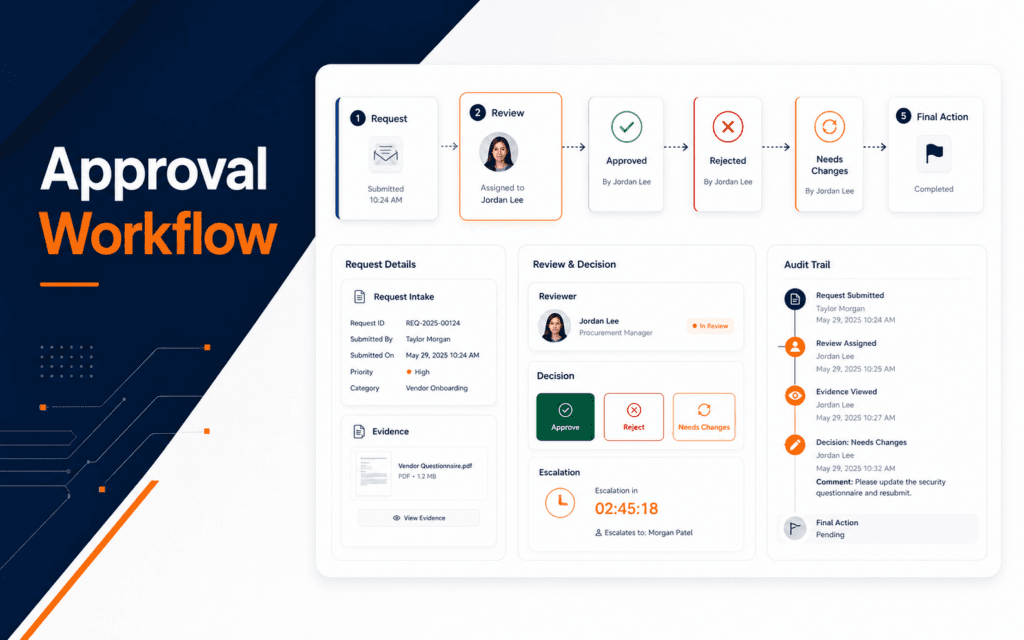
An approval automation workflow helps teams move routine decisions faster while keeping a human responsible for the final call. The practical structure is to define the request, choose the approver, collect the evidence, send the approval, record the decision, trigger the next action, escalate overdue items, and keep an audit trail. Use this guide to diagnose and resolve the problem when approvals are slow, unclear, untracked, or triggering the wrong next action. This is useful for AI agents, content drafts, document sign-off, expense requests, admissions actions, and any workflow where automation should support judgment rather than replace it.
Microsoft Learn describes Power Automate approvals as a way to automate sign-off requests and combine human decision-making with workflows. That is the heart of the pattern. Automation moves the request. A person makes the decision.
Define The Approval Decision
Start by writing the decision in one sentence. Examples include approve a content draft, accept a course enquiry follow-up, publish a design, approve a refund, send an email campaign, or allow an AI-generated summary to move into a CRM.
The decision must be specific. “Review this” is weak. “Approve this draft for publishing” is stronger. A clear decision helps the requester, approver, automation rule, and audit record.
Also define possible outcomes. Common outcomes are approved, rejected, needs changes, escalated, expired, or cancelled. Avoid free-form outcomes when the next automation step depends on the result.
The AI Automation and Agent Development course connects to this because reliable agents often need review checkpoints before taking visible action.
Collect The Right Evidence
Approvers need enough context to decide without hunting through five systems. Include request title, requester, reason, related link, summary, deadline, risk level, and recommended action. If an AI tool prepared the summary, label it clearly and include the source record.
Do not overload the approval card. Too much information slows review. Put the key facts in the request and link to supporting material when needed.
For content or design approval, include the final preview. For a refund approval, include order details and policy context. For an AI action, include the original user request, proposed output, and what will happen if approved.
Choose The Approver
Approval routing should match authority. A teacher may approve a course note. A manager may approve a budget item. A website owner may approve a public page. A developer may approve a production integration.
Avoid sending every request to the same person. That creates bottlenecks and weak decisions. Use categories, risk level, amount, department, or content type to route to the right reviewer.
Microsoft’s approval documentation also includes sequential approval patterns. Sequential approval is useful when one decision must happen before another, such as team lead approval before finance approval.
Design The Request Flow
A simple flow starts when a request is submitted, validates required fields, creates an approval item, notifies the approver, waits for a decision, records the outcome, and triggers the next step.
Keep the waiting state visible. The requester should know whether the item is pending, approved, rejected, or overdue. Hidden pending work becomes frustration.
If the workflow involves AI output, add a review state before public delivery. An AI agent can draft, classify, summarize, or recommend, but the workflow should decide which actions require human approval.
The Artificial Intelligence course is relevant because students need to understand where human judgment belongs in AI-assisted systems.
Record The Audit Trail
An approval without a record is just a notification. The audit trail should include request ID, requester, approver, submitted time, decision time, decision result, comments, related files, and action taken after the decision.
Audit trails help when someone asks why a post was published, why a refund was denied, why a lead was escalated, or why an automated action ran. They also help teams improve rules later.
Do not store private data unnecessarily in the audit trail. Keep the decision trace useful but controlled. Link to protected records instead of copying sensitive content everywhere.
Create Request Templates
Templates make approval requests consistent. A content approval template may include title, draft link, target audience, source notes, image status, SEO note, and requested decision. A refund template may include order ID, amount, reason, policy reference, and risk level.
The template should collect the evidence needed for the decision and nothing more. Too little context creates delays. Too much context makes reviewers ignore the important parts.
Use separate templates for different approval types. A design review, website change, AI-generated message, and finance approval do not need the same fields. Reusing one giant template usually creates clutter.
Set Permissions And Ownership
Approval automation needs clear ownership. Decide who can submit requests, who can approve them, who can reassign them, who can edit templates, and who can view audit history. Without permission rules, the workflow can become noisy or unsafe.
Use role-based access where possible. A requester should not be able to approve their own high-risk request. A reviewer should see enough context to decide, but not unrelated private records.
Ownership also matters after approval. If the approved action fails, someone must know who is responsible for repair. Put that owner in the workflow design instead of discovering the gap during an incident.
Keep The User Informed
Approval workflows should show status to the requester. A person who submits a request should know whether it is pending, approved, rejected, overdue, or waiting for changes. Silent workflows create duplicate messages and manual follow-up.
Use plain status labels and short notifications. The requester does not need every internal log line. They need to know what happened, who has the request, and what action is expected next.
For public-facing or student-facing workflows, status clarity protects trust. An automated process that disappears after submission feels broken even when the backend is technically working.
Define The Approved Action
Approval should trigger one clear action. If approval publishes a post, sends an email, updates a CRM, or runs an AI agent, write that action into the workflow. Ambiguous approval creates mistakes because different team members assume different outcomes.
The approved action should also be idempotent where possible. If the automation receives the same approval event twice, it should not send two emails, create two tickets, or publish the same update twice. This connects approval design with reliable automation design.
For risky actions, include a final summary before approval. The reviewer should see what will happen after clicking approve, not discover it afterward.
Handle Rejections And Changes
A good approval workflow handles more than approved or rejected. Many real requests need changes. The system should let the approver explain what must change and return the item to the requester.
Keep resubmission clear. The next approval request should show what changed, not restart the whole conversation from zero. Version notes matter for content, design, policy, and technical changes.
If rejections repeat, review the request template. Repeated confusion may mean the form is missing evidence, the criteria are unclear, or the wrong person is approving.
Add Escalation Rules
Approvals can stall. Add a deadline, reminder, and escalation path. The escalation should be appropriate to the risk. A low-risk social post may only need a reminder. A time-sensitive payment or admissions action may need a backup approver.
Avoid aggressive reminders that annoy reviewers. A better pattern is one reminder near the deadline, then escalation when the item becomes overdue.
Record escalation in the audit trail. Future reviewers should see when the request was escalated and why.
Test The Failure Cases
Test more than the happy path. Submit a complete request, incomplete request, rejected request, request needing changes, overdue request, escalated request, duplicate request, and approval where the next system fails.
If the next action sends an email, updates WordPress, creates a ticket, or calls an AI model, test what happens when that action fails after approval. The decision should not disappear.
The Full Stack Web Development course connects here because robust approval workflows depend on forms, APIs, databases, notifications, and retry behavior.
Improve The Workflow Over Time
Approval data can show bottlenecks. Track request count, average approval time, rejection reasons, overdue items, escalation count, and repeated missing fields. These are workflow signals, not vanity metrics.
Use the data to simplify requests. If approvers always ask for the same missing item, add it to the form. If one category is always low-risk, consider lighter review. If one category creates serious mistakes, add stronger evidence requirements.
Review the workflow after real use. The first version should be intentionally simple, but it should not stay frozen. Remove approval steps that add no value, strengthen steps that catch real mistakes, and update templates when the team’s work changes.
This improvement loop keeps automation practical. The goal is not to make people click more buttons. The goal is to put human attention exactly where it protects quality, privacy, cost, or public trust.
This topic also has a local training use for students in Gujrat, Punjab, Pakistan: this checklist can be compared with practical exercises in the AI Automation and Agent Development. Confirm current batch requirements directly and judge the learning path by inspectable work.
FAQ
What is an approval automation workflow?
It is a workflow that sends a structured request to the right human reviewer, records the decision, and triggers the next action based on the result.
Should AI actions always need approval?
No. Low-risk suggestions may not need approval, but public, financial, personal-data, or irreversible actions should usually include human review.
What belongs in an approval audit trail?
Include request ID, requester, approver, timestamps, decision, comments, related records, escalation events, and the final action taken.
Want to Build Practical Technology Skills?
Explore RisingEdge courses designed to help students learn real skills, build projects, and prepare for career opportunities.