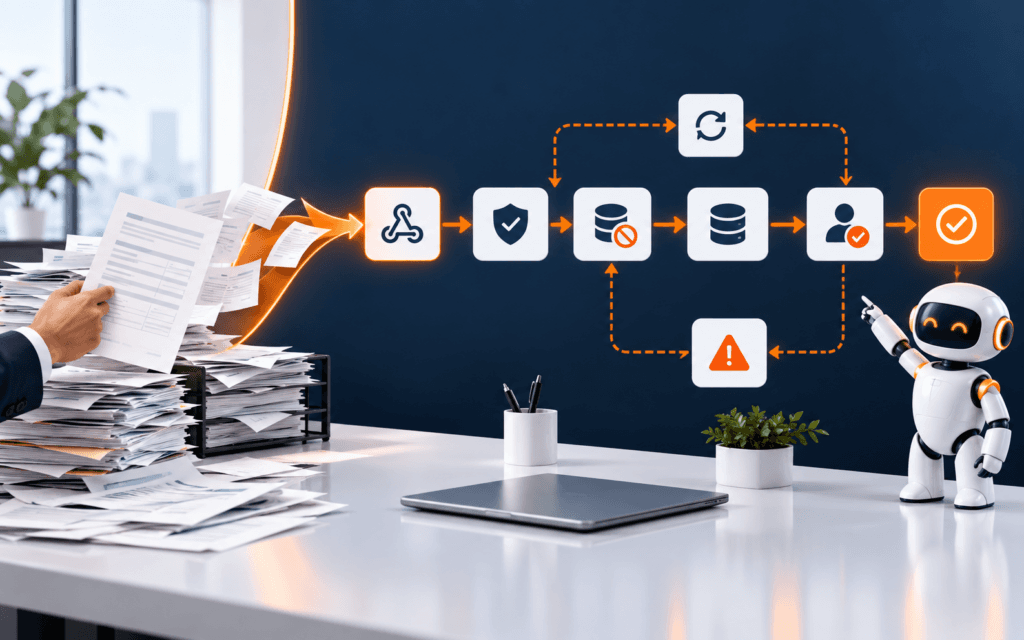
AI Automation Agents Tutorial: Trigger, Tool, Review, Log
An AI automation agents tutorial should begin with a small controlled workflow, not a fully autonomous system. The safest first pattern is trigger, context, instruction, tool.

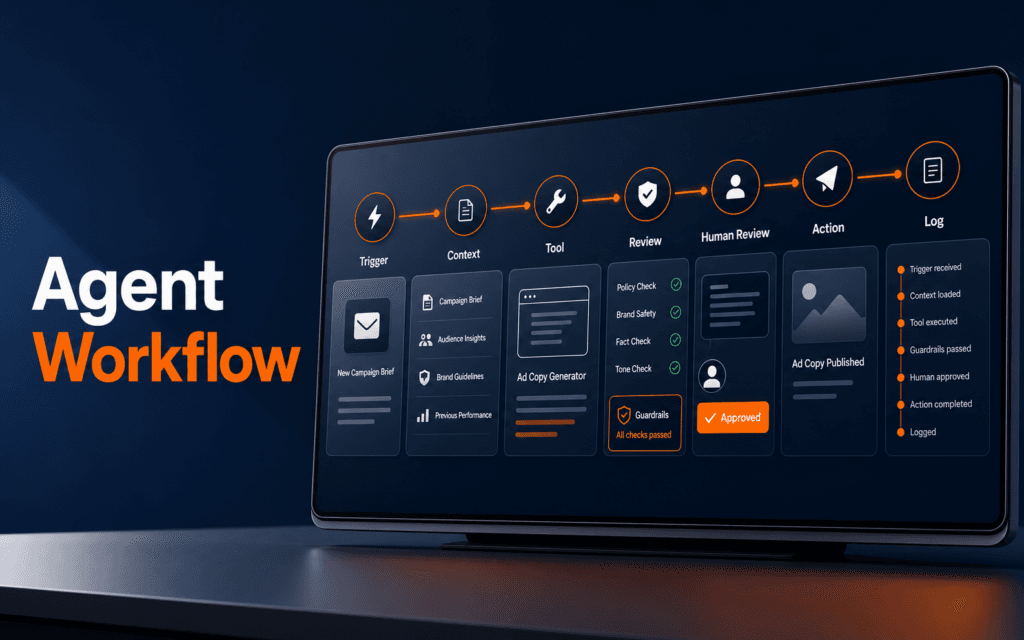
An AI automation agents tutorial should begin with a small controlled workflow, not a fully autonomous system. The safest first pattern is trigger, context, instruction, tool, guardrail, human review, action, and log. That pattern lets beginners build useful automations while keeping decisions traceable and reversible.
OpenAI’s Agents SDK documentation describes managed workflows with turns, tool execution, guardrails, handoffs, and sessions. It also describes an agent as a model configured with instructions, tools, handoffs, guardrails, and structured outputs. The lesson for beginners is clear: an agent is not just a chatbot. It is a workflow component that needs boundaries.
Choose One Narrow Workflow
Pick one workflow that is useful and low risk. Good first examples include classifying contact form enquiries, drafting a reply for human approval, summarizing support messages, checking whether a blog draft has missing metadata, or routing a task to the right team member.
Avoid workflows that spend money, delete records, publish public content, change permissions, or send sensitive messages without review. Those can come later after the control pattern is proven.
Write the workflow in one sentence: “When a new course enquiry arrives, classify the topic, draft a short reply, and send it to a human for approval.” That sentence gives you the trigger, task, output, and review point.
The AI Automation and Agent Development course connects to this because useful automation depends on reliable process design, not only prompt creativity.
Define The Trigger
The trigger starts the automation. It might be a form submission, new email, spreadsheet row, support ticket, scheduled time, webhook, or manual button. A good trigger is specific and testable.
Record what data the trigger provides. A form submission might include name, email, course interest, message, and timestamp. A webhook might include event type, record ID, status, and source system. If the trigger data is unclear, the agent will guess or fail.
Also define when the workflow should not run. For example, ignore duplicate submissions, test records, empty messages, or records already marked reviewed. This prevents repeated actions.
Provide Context And Instructions
The agent needs enough context to act consistently. Give it the task, allowed sources, output format, tone, privacy rules, and escalation rules. Keep the instruction practical and short enough to review.
For an enquiry classifier, the instruction might say: classify the message into admissions, fees, timing, technical support, or other; return one category, one reason, and whether human follow-up is required. Do not invent fees or availability. Do not include private contact details in the summary.
The Prompt Engineering course is relevant because agent reliability starts with clear instructions, examples, output formats, and review constraints.
Add One Tool At A Time
OpenAI’s Agents SDK documentation describes tools as a way for agents to take actions such as fetching data, running code, calling APIs, or using a computer. For beginners, that means tools should be added slowly.
Start with one read-only tool. For example, let the agent look up approved course page URLs or retrieve an internal FAQ snippet. After that works, add a draft-writing step. Only later add a write action, and keep it behind human approval.
Every tool needs a purpose, input, output, failure state, and permission boundary. If a tool can update WordPress, send email, or modify a CRM, it should be protected by approval and logging.
Use Structured Output
Structured output makes automation easier to validate. Instead of asking for a free-form answer, ask for fields such as category, summary, suggested_reply, confidence, needs_human_review, and reason.
This structure helps the next step decide what to do. If needs_human_review is true, the workflow should stop for approval. If confidence is low, it should request clarification. If required fields are missing, it should fail safely.
Structured output also makes logs useful. A future reviewer can see why the agent chose a category instead of searching through a long chat transcript.
Add Guardrails And Refusal Rules
Guardrails are checks that keep the workflow inside its allowed path. A beginner workflow can use simple guardrails: reject empty inputs, block private data from summaries, prevent unsupported claims, require approved links, and stop when the message asks for something outside the workflow.
For example, an admissions reply draft should not invent pricing, discounts, schedules, or guarantees. It can say that the enquiry needs a human adviser when information is missing.
Do not treat guardrails as decoration. Test them with bad inputs. Use examples that include private phone numbers, unrelated requests, unclear messages, and attempts to force the workflow outside its role.
Place Human Review Before External Action
Human review is the control point that keeps beginner automation safe. If an agent drafts an email, a person should approve it before sending. If it recommends a WordPress update, a person should review the change before publishing. If it classifies a lead, a person should verify high-risk or low-confidence cases.
The review screen should show the original input, agent output, reason, confidence, source links, and action buttons. The reviewer should be able to approve, edit, reject, or escalate.
This is where automation becomes practical instead of risky. The agent saves time by preparing the work. The human protects quality, accuracy, and brand trust.
Create An Audit Log
Every agent run should create a compact log. Include timestamp, trigger ID, input reference, agent version, tools used, output, reviewer decision, final action, and error state. Do not store unnecessary private data in the log.
Logs make debugging possible. If a workflow sends the wrong draft to review, the log shows whether the issue came from the trigger, instruction, tool result, model output, or human action.
Logs also support improvement. Review a few failed runs each week and update examples, guardrails, or routing rules based on real evidence.
Use Handoffs Only When Needed
OpenAI’s Agents SDK documentation describes handoffs as a way for one agent to delegate work to another specialized agent. Beginners should not start with many agents. Use handoffs only when the tasks are genuinely different.
For example, one agent might classify the enquiry and another might draft a reply from approved course information. That division can help when each task needs different instructions and checks. It is unnecessary when one clear instruction can handle the workflow.
More agents create more places for errors, logs, and review. Add complexity only when it removes confusion.
Test The Workflow
Create test cases before using real submissions. Include normal enquiries, incomplete messages, private details, irrelevant requests, duplicate records, and unclear intent. For each case, define the expected category, output, review state, and allowed action.
Run the workflow and compare results with the expected outcome. Fix instructions and guardrails before adding more tools. If the workflow only works for ideal examples, it is not ready.
The WordPress Development course can connect when students build automations around blog drafts, forms, content review, or CMS workflows.
Diagnose And Resolve The Problem
When an agent workflow fails, diagnose and resolve the problem in the same order as the workflow runs. First check whether the trigger fired once and carried the expected data. Next check whether the context was complete. Then check whether the instruction matched the task, whether the tool returned valid data, whether the structured output matched the schema, whether the guardrail blocked the right cases, and whether the reviewer saw enough evidence to approve or reject the action.
This order prevents random fixes. If the trigger sent an empty message, changing the prompt will not solve the real issue. If the tool returned outdated course information, changing the review screen will not fix the source. If the guardrail is too strict, the workflow may stop good cases before review. Debug the earliest failed step first.
Write the resolution beside the failed run. For example: “trigger duplicated record, added idempotency key”; “tool returned missing URL, added source validation”; “reviewer lacked context, added original message panel.” These notes turn agent problems into reusable improvements.
Handle Failures Safely
Every automation needs a failure path. A tool may time out. A form may send incomplete data. An API may return an error. A model may produce invalid structured output. A reviewer may reject the draft. If the workflow has no failure plan, it may repeat the same bad action or silently drop important work.
Define what happens on failure. Some failures should retry once. Some should stop and notify a human. Some should create a draft record with an error status. Some should never retry because repeating the action could duplicate emails, posts, orders, or support tickets.
A safe beginner rule is simple: retries are acceptable for read-only or temporary failures, but external actions should be idempotent and reviewed. If the workflow might send, publish, charge, delete, or update a record, it needs stronger protection.
Set Permissions Deliberately
Agent tools should have the smallest permission needed for the job. A tool that only needs to read course information should not have permission to edit website content. A draft-writing workflow should not have permission to publish directly. A support classifier should not have access to unrelated private records.
Permission boundaries reduce damage when a prompt, tool, or configuration is wrong. They also make review easier because the team can see what the automation is allowed to do.
For practice projects, write a permission note beside each tool: read-only, draft-only, requires approval, or allowed to execute. This small label forces better design.
Final Beginner Agent Pattern
Use this pattern for your first AI automation agent: one trigger, one clear instruction, one read-only tool, structured output, guardrails, human review, a final approved action, and an audit log. Publish or send nothing automatically until the review path is reliable.
Agents are useful when they make a workflow clearer, faster, and more traceable. They are risky when they hide decisions behind vague automation.
Prospective students in Gujrat, Punjab, Pakistan can take this checklist into a conversation about the AI Automation and Agent Development. It creates specific questions about practice, feedback, testing, and project completion while avoiding assumptions about a particular batch.
FAQ
What is an AI automation agent?
An AI automation agent is a workflow component that uses instructions, context, tools, and outputs to help complete a task, often with review and logging.
Should beginners build fully autonomous agents?
No. Beginners should start with narrow workflows that include human review before external actions such as sending, publishing, or updating records.
What should every first agent workflow include?
Use a trigger, context, instruction, tool boundary, structured output, guardrails, human review, final action, and audit log.
Want to Build Practical Technology Skills?
Explore RisingEdge courses designed to help students learn real skills, build projects, and prepare for career opportunities.