Webhook Automation Checklist: Retries, Idempotency, Logs
A webhook automation checklist helps teams build automations that survive duplicate events, delayed deliveries, server errors, and partial failures. The practical workflow is to.

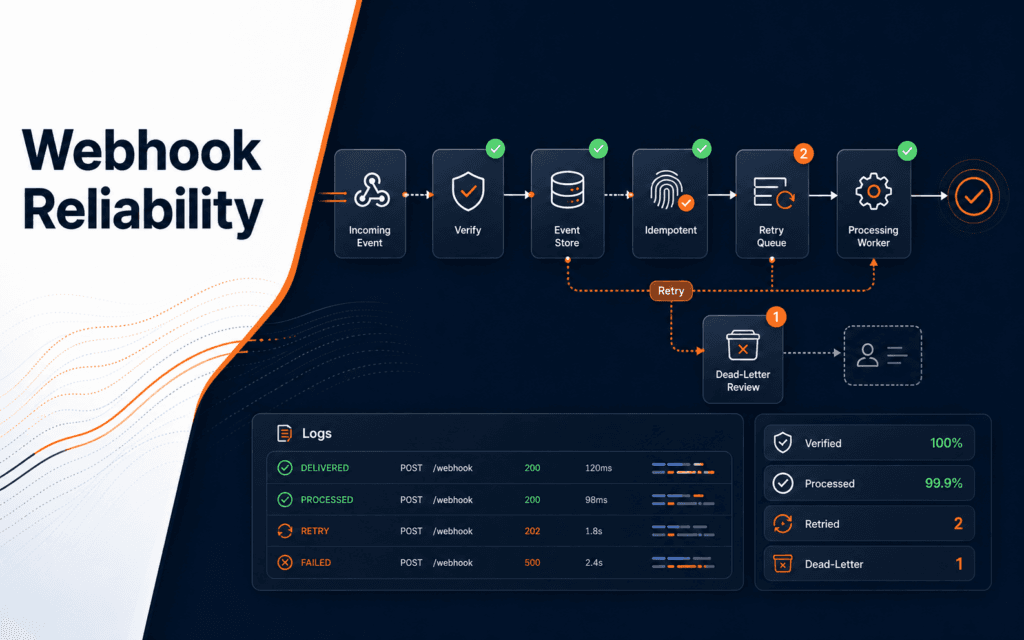
A webhook automation checklist helps teams build automations that survive duplicate events, delayed deliveries, server errors, and partial failures. The practical workflow is to verify the sender, store the event, process it idempotently, respond quickly, retry safely, log every state change, and provide a recovery path when delivery fails. This matters for AI agents, CRM updates, payment events, course enquiry routing, and any workflow where an outside system triggers an action on your server.
GitHub describes webhooks as a way to receive data when events happen instead of polling an API repeatedly. Stripe documents automatic webhook retries for failed deliveries in live mode. Those details reveal the core design problem: a webhook is not a guaranteed single clean message. It is an event delivery that can be late, repeated, invalid, or temporarily impossible to process.
Define The Event And Action
Start by naming the event and the action it should trigger. A payment succeeded event may unlock access. A form submitted event may create a lead. A repository event may notify a project board. An AI workflow event may summarize a message or route a task.
Write the expected input, required fields, sender, action, side effects, and owner. Side effects are the important part. Sending an email, creating a user, charging money, changing a status, or calling an AI agent should not happen accidentally twice.
Hold off on connecting a webhook directly to a risky action before this is clear. A clean diagram with event, validation, storage, processing, and output is enough for a beginner project.
The AI Automation and Agent Development course connects to this because reliable automations depend on event design, not just a tool that receives a request.
Verify The Sender
A webhook endpoint is usually public. That means the server must verify that the delivery came from the expected sender before processing it. Many providers support signed payloads or secrets.
GitHub’s webhook creation guidance says a webhook secret can help limit incoming requests to deliveries that originate from GitHub when the delivery is validated. Stripe also documents signature verification in its webhook flow. The exact implementation differs by provider, so follow the provider’s official docs.
Reject unsigned or invalid requests before doing business work. Do not call an AI model, update a database, or send an email from an unverified payload.
Also check the event type. A valid sender can send events your endpoint does not need. Unknown events should be ignored or logged safely, not processed as if they were expected.
Store The Event Before Processing
For reliability, store the event ID, event type, received time, verification status, processing status, and a compact safe payload reference before running expensive work. This creates a record for retries and troubleshooting.
Keep secrets, full payment data, private messages, and sensitive raw payloads out of storage unless the application genuinely needs them and has the right controls. A compact event record is usually enough for tracking.
The event record should have states such as received, verified, processing, completed, failed, skipped_duplicate, and needs_manual_review. States make automation observable.
If the server crashes after receiving the event but before processing it, the stored record helps the team recover. Without a record, the team may not know what happened.
Make Processing Idempotent
Idempotency means the same event can be handled more than once without causing duplicate side effects. Stripe’s API documentation explains that idempotency keys allow safe retries without accidentally performing the same operation twice. The same idea applies to webhook handlers.
Use a stable provider event ID or a generated idempotency key. Before processing, check whether the event or action has already completed. If yes, return success or skip safely instead of repeating the work.
This is critical for payments, account creation, email sending, course access, and AI-generated outputs. A duplicate webhook should not create two records, send two invoices, or run the same expensive agent twice.
For a beginner implementation, a database table with a unique event ID is often the simplest control. For higher-volume systems, queues, locks, and transactional updates may be needed.
Respond Quickly And Process Safely
Webhook providers often expect a timely response. If your handler performs slow work before responding, the provider may treat the delivery as failed and retry. That can create duplicates or pressure on your server.
A safer pattern is to verify the request, store the event, enqueue or schedule processing, and return a success response when the event has been accepted. Then a worker can perform slower tasks.
This is especially useful for AI automations. Calling a model, summarizing a message, generating a draft, or contacting another API can take time. Those steps belong in controlled processing, not in a fragile request path.
The Full Stack Web Development course is relevant because webhook reliability depends on backend routes, databases, queues, HTTP responses, and deployment behavior.
Plan Retries By Provider Behavior
Providers handle failed deliveries differently. Stripe documents automatic retries for up to three days with exponential backoff in live mode. GitHub’s failed delivery documentation says GitHub does not automatically redeliver failed webhook deliveries, so teams need their own recovery process or manual redelivery.
This means the retry plan cannot be generic. Read the provider documentation. Decide whether retries are automatic, manual, API-driven, or handled by your own queue.
Your internal processing also needs retry rules. A temporary network failure may be retryable. An invalid payload is not. A rate limit may need backoff. A permanent validation failure should move to a dead letter or manual review state.
Never retry forever without visibility. Infinite retries can hide a broken integration and overload the system.
Log Useful States
Logs should answer what arrived, whether it was verified, whether it was a duplicate, what action was attempted, what failed, and what the final state is. Use structured logs with event ID, provider, event type, status, attempt count, and error code.
Avoid logging secrets, authorization headers, full private payloads, or user-sensitive data. Logs are for debugging and audit, not a second database of private content.
Add dashboard or report fields when the automation becomes important. Count received events, completed events, duplicate skips, failed events, retry attempts, and manual reviews. A small count can reveal a broken integration before users complain.
For AI workflows, also record model call status, output status, and whether human review was required. Do not store full AI outputs in the event log unless that is part of the approved data design.
Create A Recovery Path
Every webhook system needs a recovery path. The recovery path might replay a stored event, ask the provider to redeliver, run a manual repair script, or reconcile with the provider’s API.
Recovery should not create duplicate production actions. It should use the same idempotency checks as normal processing. If the event already completed, recovery should report completed, not repeat the side effect.
For high-value workflows, add a dead letter queue or needs_review status. That gives the team a place to inspect events that failed permanently. It also prevents hidden data loss.
The Artificial Intelligence course connects when automated systems make recommendations or decisions. Recovery should preserve context so reviewers can understand what the system did.
Test Failure Cases
Test more than the happy path. Send a valid event, duplicate event, invalid signature, unknown event type, missing field, slow processing case, provider retry, internal retry, database failure, and downstream API failure.
Use local forwarding tools only for development. Deploy to a proper server before production, then update the provider’s webhook URL and test the real deployed route.
Write down expected behavior for each test. For example: invalid signature returns an error and does not store business output; duplicate event returns success and skips side effects; temporary downstream failure moves to retry.
Testing failure cases is slower than clicking one successful demo, but it is the only way to know the automation is production-ready.
Use A Dead Letter Review
Some events should stop retrying and move into a review state. This is often called a dead letter queue, but a small team can start with a database status such as needs_manual_review. The point is to separate temporary failures from events that need a human decision.
Put invalid signatures, unsupported event types, missing required fields, repeated downstream failures, and risky duplicate conflicts into a visible review list. Include enough context to investigate: event ID, provider, event type, received time, last error code, attempt count, and safe notes.
Review should have a clear action. The team may mark the event ignored, replay it, repair related data, contact the provider, or change the automation rule. Without a review state, failed events often disappear into logs that nobody reads.
Final Webhook Automation Checklist
Before relying on a webhook automation, confirm event definition, sender verification, expected event types, safe event storage, idempotency key, duplicate handling, quick response path, internal retry rules, provider retry behavior, structured logs, recovery path, privacy controls, and failure tests.
Students considering technology training in Gujrat, Punjab, Pakistan can use this checklist to judge the practical depth of the AI Automation and Agent Development. The useful evidence is the work a learner can explain, test, and improve, not a list of tools alone.
FAQ
What is webhook idempotency?
Webhook idempotency means the handler can receive the same event more than once without repeating the final business action.
Should webhook processing happen inside the HTTP request?
Only small verification and storage steps should happen there. Slow or risky work is usually safer in a worker, queue, or scheduled process.
Why do webhook logs matter?
Logs make delivery, verification, retries, duplicates, and failures visible so the team can recover without guessing.
Want to Build Practical Technology Skills?
Explore RisingEdge courses designed to help students learn real skills, build projects, and prepare for career opportunities.