AI Agent Operations Checklist: Approvals, Logs, Fallbacks, Metrics
An AI agent operations checklist turns a promising demo into a controlled workflow. Before an agent supports real work, define approvals, tool permissions, guardrails, logs.

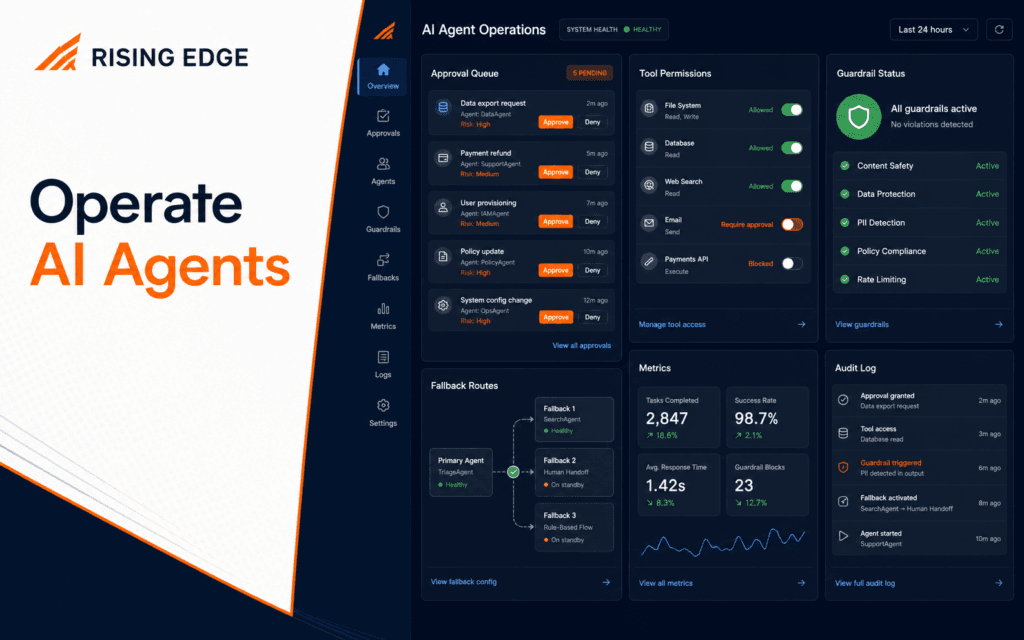
An AI agent operations checklist turns a promising demo into a controlled workflow. Before an agent supports real work, define approvals, tool permissions, guardrails, logs, fallbacks, metrics, and version review.
OpenAI Agents SDK documentation describes agents as models configured with instructions, tools, handoffs, guardrails, and structured outputs. That definition is useful because it shows the operational surface. Each of those parts can fail, so each needs a control.
Start With The Workflow Boundary
Write what the agent is allowed to do and what it must never do. A beginner workflow might classify enquiries, draft replies, route tasks, or check content metadata. It should not publish, send, delete, refund, or change permissions without approval.
The boundary should name input sources, output fields, allowed tools, reviewers, failure behavior, and data that must not be stored. If the boundary is unclear, the agent will drift into work it was not designed to handle.
The AI Automation and Agent Development course fits this stage because good automation starts with process boundaries before tools are added.
Require Approval For Sensitive Actions
Human approval is not a weakness. It is a production control. The OpenAI Agents SDK human-in-the-loop flow can pause execution until a person approves or rejects sensitive tool calls.
Use approval when an action sends a message, publishes content, updates a record, spends money, changes user access, or affects a public page. The reviewer should see the original input, proposed action, reason, source links, and risk flags.
Approval should allow approve, edit, reject, and escalate. A review screen that only has approve is not enough for real work.
Limit Tool Permissions
Each tool should have the smallest permission needed. A lookup tool should read approved information. A draft tool should create a draft. A publishing tool should require approval and should be unavailable to early prototypes.
Do not give one agent broad permissions because it is convenient. Tool boundaries reduce damage when instructions are wrong, context is missing, or a user input is hostile.
For every tool, write purpose, inputs, outputs, permission level, failure state, and owner. This takes a few minutes and prevents many operational problems.
Add Guardrails Around Tool Calls
Guardrails validate whether an input or output is allowed. The Agents SDK documentation describes tool guardrails that can validate or block tool calls before and after execution.
A beginner agent can use simple guardrails: reject empty input, block private data from summaries, require approved links, enforce structured output, stop unsupported claims, and prevent publish actions without approval.
Test guardrails with bad examples. Include missing fields, private contact details, prompt-injection attempts, unrelated requests, and duplicate records.
Use Structured Outputs
Structured output makes operations easier to monitor. Instead of a long free-form answer, return fields such as category, summary, proposed_action, confidence, needs_approval, sources_used, and risk_flags.
The next workflow step can validate fields before acting. If confidence is low, stop. If sources are missing, stop. If risk flags include private_data or public_publish, require review.
The Prompt Engineering course is useful because reliable structured outputs depend on clear instructions, examples, and schemas.
Keep A Run Log
Every agent run should leave a compact log. Include timestamp, workflow version, trigger ID, input reference, tools used, output summary, approval decision, final action, and error state.
Do not store unnecessary private data. Store enough to debug the workflow without creating a new privacy problem.
Logs should answer three questions: what happened, why did the agent do it, and who approved the final action. Without those answers, operations become guesswork.
Create Fallback Paths
Agents need a safe path when something goes wrong. A tool may time out, a response may fail schema validation, a source may be unavailable, or a reviewer may reject the action.
Define fallback rules before launch. Retry read-only failures once. Stop on missing required fields. Send low-confidence cases to a human. Never repeat an external action unless it is idempotent and safe.
A fallback is better than silent failure. It protects users and gives the team a clear next step.
Track The Right Metrics
Metrics should measure workflow quality, not only activity. Track approval rate, rejection reasons, low-confidence rate, schema failures, tool failures, average review time, repeated errors, and successful completion.
Do not celebrate a high automation rate if reviewers keep correcting the output. A useful agent reduces work while preserving accuracy and trust.
Review metrics weekly. Pick one recurring failure and improve the instruction, data source, tool boundary, or review screen.
Review Data Retention
Agent logs are useful, but they should not become a warehouse of private information. Decide what the workflow stores, how long it stores it, who can read it, and when it should be removed.
For many beginner workflows, store references and summaries instead of full raw messages. Mask phone numbers, emails, and private notes when they are not needed for debugging.
Retention rules make the agent easier to trust. They also teach students that automation quality includes data handling, not only prompt behavior.
Define Ownership And Escalation
Every operated agent needs an owner. Someone must review failures, update prompts, rotate credentials, approve tool changes, and decide when the workflow should be paused.
Escalation rules should be written before launch. For example, send low-risk formatting failures to the content owner, private-data issues to an administrator, and repeated tool failures to the developer responsible for the integration.
Without ownership, agents become invisible background systems. That is risky because errors can repeat quietly until a user notices.
Version Prompts And Tools
When prompts, tool permissions, schemas, or guardrails change, record a version. Without versioning, you cannot explain why the workflow behaved differently this week.
A simple version note can include date, change, reason, test cases, reviewer, and rollback plan. Keep old versions long enough to investigate recent runs.
This habit also helps students build a professional portfolio. It shows that they can operate systems, not only demo them.
Use Handoffs Carefully
The Agents SDK documentation describes handoffs as a way for one agent to delegate work to another specialized agent. Handoffs are useful when tasks need different instructions or expertise.
Do not add handoffs just because they sound advanced. A triage agent and a reply-drafting agent may make sense. Five agents for one simple enquiry probably creates unnecessary failure points.
Use handoffs when specialization improves clarity, and log the handoff reason so reviewers understand the route.
Apply The Checklist To WordPress Workflows
A beginner WordPress agent workflow might review a draft, check metadata, suggest internal links, and prepare a publishing checklist. It should not publish directly until approval, logs, and read-back checks are reliable.
The WordPress Development course connects because CMS workflows involve public pages, media, metadata, permissions, and revision history.
For public content, require source review, placeholder scan, image check, SEO metadata read-back, and final human approval before publishing.
Run A Prelaunch Simulation
Before connecting the agent to real work, run a simulation with saved test inputs. Include normal requests, malformed requests, duplicate events, missing source data, rejected approvals, and tool failures.
The simulation should prove that the workflow can complete good cases and stop bad cases. If every test simply passes, the simulation is too easy.
Save the simulation notes beside the workflow version. When something breaks later, those notes tell the team what was known before launch and what new case appeared in production.
Pause The Agent When Risk Changes
A workflow that was safe yesterday may become unsafe after a new tool, policy, data source, or public channel is added. Build a pause rule into operations.
Pause when approval failures spike, logs show repeated tool errors, private data appears unexpectedly, source content changes, or the agent starts receiving tasks outside its boundary.
A pause is not a failure. It is a control that gives the team time to inspect evidence, update the workflow, and relaunch with a clear version note.
After relaunch, monitor the first several runs closely. Compare them with the prelaunch simulation and keep the approval path active until the new version proves stable.
Record what changed, who approved the relaunch, and which checks must pass before normal operation resumes in production again.
Final Operations Checklist
Before using an agent in real work, confirm the workflow boundary, approval rules, tool permissions, guardrails, structured output, logs, fallbacks, metrics, versioning, and review ownership.
An agent is ready when the team can explain what it is allowed to do, how it is checked, how it fails safely, and how a bad run can be investigated.
Test the fallback while dependencies are deliberately unavailable. Disable a tool, return malformed data, and delay an approval so the team can verify that logs, user messages, and recovery steps remain useful under failure.
Learners in Gujrat, Punjab, Pakistan can use this checklist as a small practice standard before choosing the AI Automation and Agent Development. Completing and explaining the work gives a clearer signal of subject fit than course terminology by itself.
FAQ
What is AI agent operations?
It is the practice of running an agent workflow with approvals, permissions, guardrails, logs, fallbacks, metrics, and version control.
When should an AI agent require human approval?
Require approval before sending, publishing, deleting, spending money, changing permissions, or updating important records.
What should an agent run log include?
Include timestamp, workflow version, trigger ID, input reference, tools used, output summary, approval decision, final action, and error state.
Want to Build Practical Technology Skills?
Explore RisingEdge courses designed to help students learn real skills, build projects, and prepare for career opportunities.