SMTP Form Delivery Observability: Request, Acceptance, Inbox, Alert
SMTP form delivery observability is an evidence chain showing what happened after a visitor submitted a website form. It distinguishes browser validation, server receipt, durable.

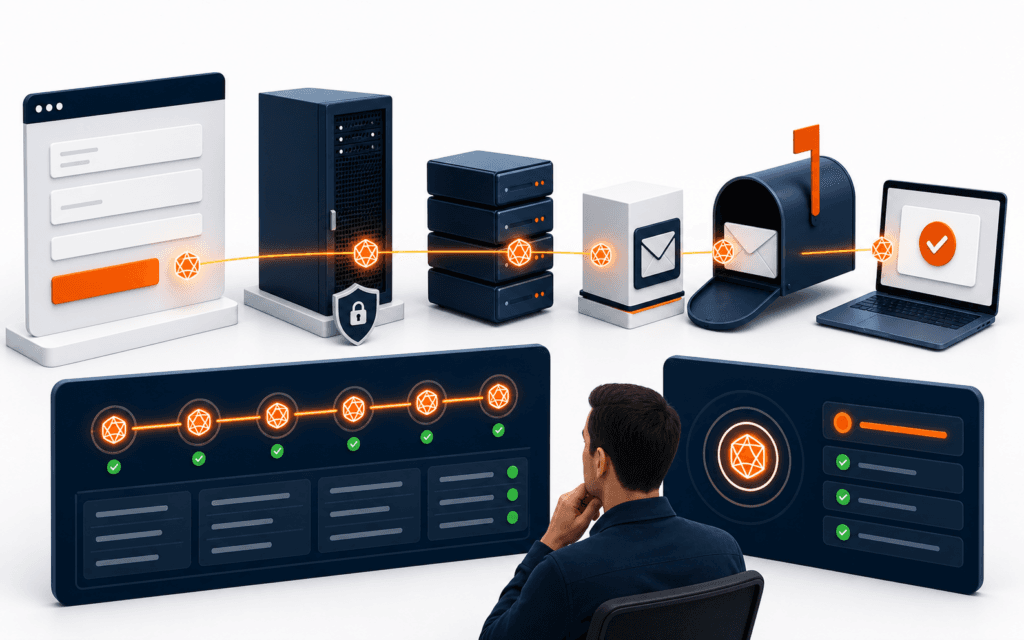
SMTP form delivery observability is an evidence chain showing what happened after a visitor submitted a website form. It distinguishes browser validation, server receipt, durable recording, SMTP connection and authentication, recipient acceptance, mailbox arrival, staff notification, and operational acknowledgement. A green success message or resolved send function proves only one part of that chain. Reconcile adjacent stage counts on a schedule so accepted requests cannot remain silently stranded between the database, queue, transport, and staff workflow.
Use synthetic submissions and privacy-safe identifiers for monitoring. Do not send real applicant, learner, or client data through test runs. Never place SMTP passwords, message bodies, full email addresses, or access tokens in logs, screenshots, analytics events, URLs, or browser-visible error responses. Define who may inspect sensitive records and how a visitor can report a missing acknowledgement without exposing the original message through an insecure channel.
Define Delivery States
Name each state explicitly: presented, client-valid, request-received, server-valid, accepted-for-processing, SMTP-attempted, SMTP-accepted, mailbox-observed, staff-acknowledged, failed, quarantined, and expired. Define the evidence and owner for every transition.
Do not label SMTP acceptance delivered. The receiving infrastructure may later route, filter, bounce, delay, or quarantine the message. Product copy should promise only what the system can observe, such as request received and reference created.
Create A Submission Identifier
Generate an opaque identifier on the server after basic request validation. Return it to the confirmation view and include it in bounded logs, the message subject or header where appropriate, and the operational record. It should not encode an email address, course choice, or personal detail.
Use the identifier to correlate events without logging the message body. Protect the lookup endpoint and rate-limit status checks. A random identifier is not authorization to reveal submission details.
Validate At The Boundary
Treat Route Handlers and Server Functions as reachable server endpoints. Validate field types, lengths, allowed values, origin or anti-abuse controls, and required consent on the server even when the browser already validates them. Reject unexpected fields.
Next.js documentation notes that public handlers require normal authorization and error handling. Return stable, safe error categories to the client; keep stack traces, environment values, provider responses, and recipient configuration on the server.
Separate Receipt From Email
Decide whether the request waits for SMTP or writes a durable job first. For important admissions or contact workflows, durable acceptance before background delivery can prevent a process restart from silently losing a valid submission. Record the job in the same transaction as the accepted state where possible.
If the architecture sends synchronously, define timeout behavior and what the visitor sees when the outcome is uncertain. Never show success before the system has met the documented acceptance contract.
Protect Sensitive Fields
Collect only information needed for the stated workflow. Keep message bodies and contact details out of general application logs, analytics, error trackers, and alert payloads. Apply retention, access, deletion, and incident rules to the durable record and mailbox copies.
Escape and encode content for both HTML and plain-text messages. Do not allow user input to set arbitrary recipients, sender addresses, reply headers, subjects, URLs, or attachments. Validate approved reply-to behavior separately.
Verify SMTP Configuration
At deployment or a protected health check, test DNS resolution, TCP connection, TLS negotiation, and authentication with the transport’s verification capability. Nodemailer documents that verify checks connection and authentication but does not prove a particular sender will be accepted.
Validate host, port, secure mode, TLS server name, authentication method, sender domain, and environment separation. Do not disable certificate verification in production to make a test pass. Rotate credentials through the approved secret store.
Set Bounded Timeouts
Configure connection, greeting, socket, DNS, and application deadlines deliberately. A browser request should not wait indefinitely for a provider. Classify timeouts by stage and record whether a durable job or SMTP transaction may still be active.
Do not retry an uncertain write blindly. Assign an idempotency key to the logical submission and ensure workers cannot send duplicates after a timeout, crash, or queue redelivery.
Interpret SMTP Results
Capture recipient acceptance and rejection lists, response codes, message identifier, envelope, and provider response without storing credentials or full content. Distinguish transient failures from permanent policy or address failures using provider and SMTP semantics.
RFC 5321 reply classes help describe server outcomes, but application policy still needs bounded retry and escalation rules. An accepted recipient does not prove inbox placement or human action.
Design Retry Policy
Retry only transient, classified failures with exponential delay, jitter, a maximum attempt count, and an expiry time. Preserve the same logical submission identifier while giving each transport attempt its own evidence record.
Send permanent failures and exhausted retries to an authorized review queue. Provide the operator with category, timestamps, attempt count, provider reference, and safe recovery actions, not the SMTP password or unrestricted message content.
Observe Mailbox Arrival
Use a controlled synthetic recipient to verify that a message becomes observable in the intended mailbox or test folder. Correlate by the synthetic submission identifier and measure delay from server acceptance. Keep this monitor separate from real visitor correspondence.
Inbox checks may require provider APIs or IMAP with narrowly scoped credentials. Protect and rotate them, limit the mailbox and folders they can access, and do not use a personal inbox for automated monitoring.
Test Filtering And Formatting
Inspect plain text, HTML, links, reply-to behavior, sender identity, subject, character encoding, responsive rendering, and accessibility in representative mail clients. Confirm required details remain understandable when images are blocked.
Do not embed remote tracking or sensitive query parameters merely to prove opening. Delivery monitoring should verify system behavior without covertly tracking staff or visitors.
Create Synthetic Journeys
Schedule a minimal test submission from the public form through the real production path using clearly labelled fictional data. Verify confirmation, durable state, SMTP evidence, test mailbox arrival, and cleanup according to policy.
Rate-limit the monitor and exclude synthetic records from admissions, lead, and conversion metrics. Alert if expected stages do not appear within their service windows, and include the synthetic identifier and failing stage.
Monitor Real Traffic Safely
Track aggregate counts and rates for accepted requests, validation failures, queue age, SMTP attempts, transient failures, permanent failures, acceptance latency, and unresolved records. Segment by environment and form type without exposing message content or personal data.
Compare adjacent stages to find silent loss. A stable request count with falling SMTP acceptance indicates a different problem from normal acceptance with missing mailbox observations. Use minimum-volume rules so small samples do not create misleading percentages.
Alert On Actionable Conditions
Alert on sustained queue age, repeated authentication failure, certificate problems, provider rejection spikes, expired jobs, missing synthetic delivery, and broken staff routing. Route each alert to an owner with a runbook and severity based on user impact.
Avoid including full submissions in chat or paging tools. Provide safe references and require authorized access to view sensitive records. Deduplicate repeated alerts and preserve the first failure time.
Test User-Facing Recovery
Simulate invalid input, rate limits, network loss, server validation failure, SMTP timeout, queue outage, and duplicate clicks. The interface should preserve non-sensitive user work where appropriate, prevent duplicate submissions, and provide a truthful next step.
Offer an alternate official contact route when a prolonged outage is confirmed. The Rising Edge contact page should display only maintained channels and should not promise receipt when downstream delivery is unavailable.
Write An Incident Runbook
Document how to identify affected time ranges, pause or drain workers, inspect provider status, rotate credentials, replay eligible jobs, contact form owners, and reconcile unresolved submissions. Include stop conditions and approval requirements.
After recovery, verify the public journey and synthetic mailbox again. Record root cause at the correct layer: browser, endpoint, validation, database, queue, SMTP connection, authentication, provider acceptance, mailbox routing, or staff process.
Verify Deployments
Run configuration verification and a synthetic journey after changes to environment variables, domains, TLS, recipients, templates, queues, or hosting regions. Confirm production is not using development recipients and previews cannot send real messages.
Keep secrets outside source code and redact command output. Review deployment logs for accidental configuration exposure, then preserve only the evidence needed to confirm version and health.
Set Service Objectives
Define measurable objectives for request acceptance, queue delay, SMTP acceptance, synthetic mailbox arrival, and unresolved incident time. Assign owners and review error budgets with form importance and traffic volume in mind.
A Full Stack Web Development course can provide guided practice connecting frontend forms and server logic. Production reliability still requires approved infrastructure, privacy controls, monitored delivery, and accountable operations.
Correlate the form submission with a message identifier that can be followed through application logs, SMTP acceptance, and mailbox delivery. Avoid placing form content or credentials in logs while retaining enough context to investigate failure.
Students considering technology training in Gujrat, Punjab, Pakistan can use the practical approach in this article to judge the practical depth of the Full Stack Web Development. The useful evidence is the work a learner can explain, test, and improve, not a list of tools alone.
FAQ
Does sendMail success prove a form email reached the inbox?
No. It can show transport acceptance, but mailbox routing, filtering, bounce processing, and human handling occur later.
Can transporter verification replace a synthetic form test?
No. Verification checks connection and authentication; it does not test a specific sender, recipient, template, public route, or mailbox arrival.
What should a form success message say?
State the stage you can prove, provide a privacy-safe reference where useful, and give a maintained recovery route without guaranteeing unread downstream delivery.
Want to Build Practical Technology Skills?
Explore RisingEdge courses designed to help students learn real skills, build projects, and prepare for career opportunities.