Form Validation Checklist: Client Rules, Server Checks, Errors
A form validation checklist helps developers prevent broken submissions, confusing errors, and unsafe input handling. The practical workflow is to define the accepted data, add.

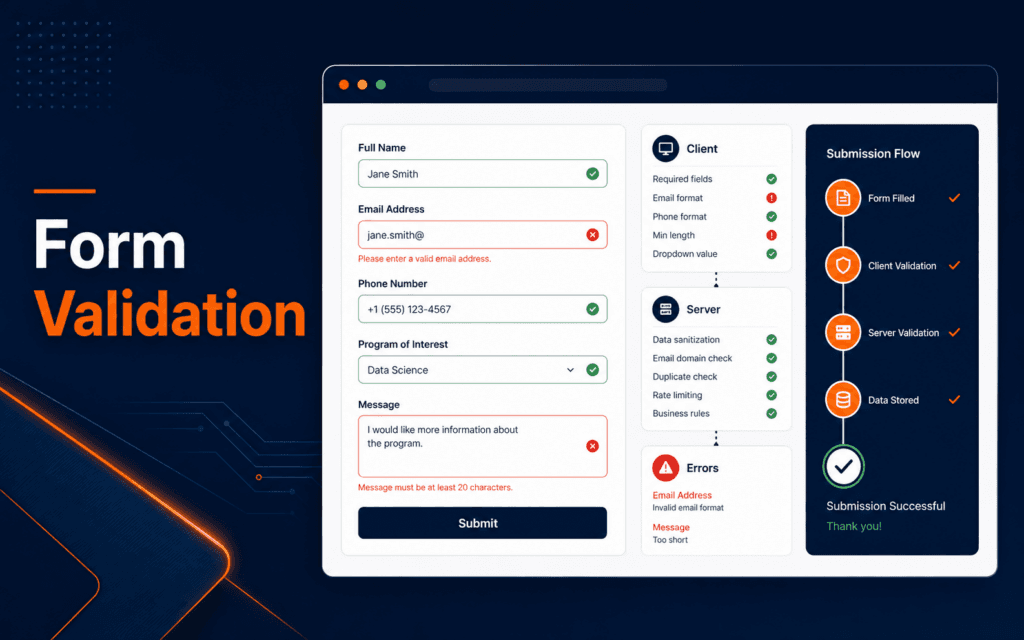
A form validation checklist helps developers prevent broken submissions, confusing errors, and unsafe input handling. The practical workflow is to define the accepted data, add helpful client-side constraints, validate again on the server, write clear error messages, preserve user input safely, test keyboard and screen reader behavior, and log failed submissions without exposing private data. A form is not reliable because it looks polished. It is reliable when it handles normal input, wrong input, missing input, and malicious input predictably.
MDN documents HTML constraint validation and the Constraint Validation API as tools for checking form controls and forms. OWASP treats input validation as a security control that defines what properly formatted input may enter an application. Those two ideas belong together: client-side validation helps users, and server-side validation protects the system.
Define Accepted Input First
Start by writing the accepted input for each field. A name field, email field, phone field, message field, course selection, file upload, coupon code, password, and date field all need different rules. Do not start with JavaScript. Start with the data contract.
For each field, record whether it is required, its allowed type, minimum and maximum length, allowed format, allowed values, and whether leading or trailing spaces should be trimmed. Also decide what should happen to unexpected characters.
OWASP recommends defining acceptable input with clear rules such as type, length, range, and format. That guidance prevents vague validation like “make sure it looks right.” A specific rule can be tested. A vague preference cannot.
Students in the Full Stack Web Development course need this habit because validation crosses frontend forms, backend routes, database constraints, and email or CRM integrations.
Use Native HTML Constraints
Native HTML constraints cover many common cases. Use required for mandatory fields, type=”email” for email fields, minlength and maxlength for length boundaries, min and max for numeric or date ranges, and pattern only when a simple regular expression is genuinely appropriate.
MDN’s Constraint Validation API documentation explains that constraint validation can happen at the control level or form level. This means the browser can help detect invalid fields before submission, but the behavior still needs design and testing.
Keep native behavior unless there is a clear reason to change it. Native constraints give users immediate feedback and reduce custom code. They also make basic rules visible in the markup, which helps future maintenance.
At the same time, native constraints are not enough for every rule. A password confirmation match, a date range dependency, or a course selection that depends on another field may need custom validation.
Add Helpful Client-Side Logic
Client-side validation should help users complete the form faster. It should not become a maze. Show errors near the field, avoid vague messages, and do not wait until the final submit if the issue is already obvious.
Use custom validity carefully. A custom message should explain the fix: “Enter a valid email address” is better than “Invalid input.” “Password must be at least 8 characters” is better than “Password failed.”
Avoid validating too aggressively while the user is still typing. Showing a red error after the first character can feel broken. A better pattern is to validate on blur, after submit, or after the user has interacted enough to understand the field.
The Web Design course connects here because validation is also interface design. Spacing, labels, focus states, contrast, and error placement change whether the form feels usable.
Validate Again On The Server
Client-side validation can be bypassed. A user can disable JavaScript, edit the request, call the API directly, or send malformed data from another client. Server-side validation is mandatory for any real application.
The server should apply the same business rules and security rules before writing to a database, sending email, creating an account, charging money, or triggering automation. If the server accepts data the client would reject, the system is inconsistent.
Return useful status codes and structured errors. For a form API, a response can include a general message and field-level errors. The frontend can then show the exact problem without guessing.
Avoid exposing sensitive validation details. It is fine to tell users an email format is invalid. It may not be fine to reveal whether an account exists, whether a coupon is valid for another user, or which security rule blocked a request.
Normalize Before Validation Carefully
Normalization means cleaning input into a consistent shape. Common examples include trimming spaces, lowercasing email addresses where appropriate, converting phone formatting, and parsing numbers or dates.
Normalize only when it does not change meaning. Trimming a message field may be safe. Altering a password field may not be. Lowercasing a course code may be fine. Lowercasing a case-sensitive token may break it.
Keep normalization and validation order clear. If you trim spaces before checking required fields, a field containing only spaces becomes empty. That is usually correct. If you check first and trim later, bad data may slip through.
Write tests for the exact order. Input bugs often hide in small transformations that looked harmless.
Write Clear Error Messages
A good error message explains what went wrong and how to fix it. It does not blame the user. It does not show raw technical text. It does not disappear before the user can read it.
Place the message near the field and use clear visual styling. Color alone is not enough. Include text, icons only as support, and focus handling that helps keyboard users find the problem.
For a multi-field issue, explain the relationship. “End date must be after start date” is better than marking both fields red with no explanation. For a file upload, say the allowed file types and size limit.
Preserve entered values when safe. A user should not lose a long message because one field failed. For sensitive fields like passwords or payment data, follow the expected security behavior instead of blindly repopulating everything.
Test Accessibility And Interaction
Validation must work for keyboard users and assistive technology. Check label associations, focus order, visible focus styles, error summaries, aria-describedby relationships, and whether messages are announced or reachable.
Test the form with keyboard only. Submit an empty form, tab through errors, correct fields, and submit again. Then test on mobile. Small screens often reveal hidden layout issues, especially when error text wraps.
Errors should not be hidden behind hover-only UI. Many users cannot or will not hover. Error content should be visible or reachable through normal interaction.
Accessible validation is not a separate polish step. It is part of whether the form actually works.
Log Failures Without Leaking Data
Logs help developers find repeated validation failures, spam patterns, broken fields, and integration problems. Log the field name, error code, route, timestamp, and request context. Avoid storing raw private messages, passwords, full tokens, or sensitive personal data.
Use stable error codes internally. A code such as invalid_email_format is easier to count than a changing sentence. The public message can stay friendly while the code supports debugging.
If a form feeds admissions, contact, checkout, or marketing workflows, failed submissions matter. A silent validation bug can block real enquiries. The SEO course is relevant when public pages depend on forms for conversions and search visitors need a working path.
Test The Full Submission Flow
Validation is not finished when the field turns green. Test the full submission path from the public page to the backend action. Submit a valid enquiry, a missing required field, a malformed email, a message at the length limit, a duplicate submission, and a request with JavaScript disabled.
Then check what happens after success. The user should see a clear confirmation. The server should store or send the expected data once. The form should not submit twice when the button is clicked quickly. Email or CRM integrations should receive the same cleaned values the server accepted.
Also test failure after the server receives valid input. SMTP may fail, a database may reject a value, or an external service may time out. The form should report the problem without losing safe user input or pretending the submission succeeded.
Final Form Validation Checklist
Before publishing a form, confirm field rules, native constraints, custom client logic, server-side validation, normalization order, clear error messages, preserved safe input, accessibility behavior, mobile layout, spam handling, logging, and integration tests. Then submit real examples through the deployed site, not only local development.
Common Form Validation Mistakes
The first mistake is trusting only the browser. The second is writing vague messages. The third is losing user input after an error. The fourth is failing to test keyboard flow. The fifth is logging sensitive values while trying to debug.
Prospective students in Gujrat, Punjab, Pakistan can take this checklist into a conversation about the Full Stack Web Development. It creates specific questions about practice, feedback, testing, and project completion while avoiding assumptions about a particular batch.
FAQ
Is client-side validation enough?
No. Client-side validation helps users, but server-side validation is still required because client rules can be bypassed.
What should a validation error message include?
It should identify the field problem and explain the fix in plain language, close to the field.
Should every field use custom JavaScript validation?
No. Use native HTML constraints for common rules and add custom logic only when the rule cannot be expressed cleanly in HTML.
Want to Build Practical Technology Skills?
Explore RisingEdge courses designed to help students learn real skills, build projects, and prepare for career opportunities.