AI Evaluation Checklist: Prompts, Test Cases, Review
An AI evaluation checklist helps beginners move from guessing to testing. The practical workflow is to define the task, write clear success criteria, collect realistic test cases.

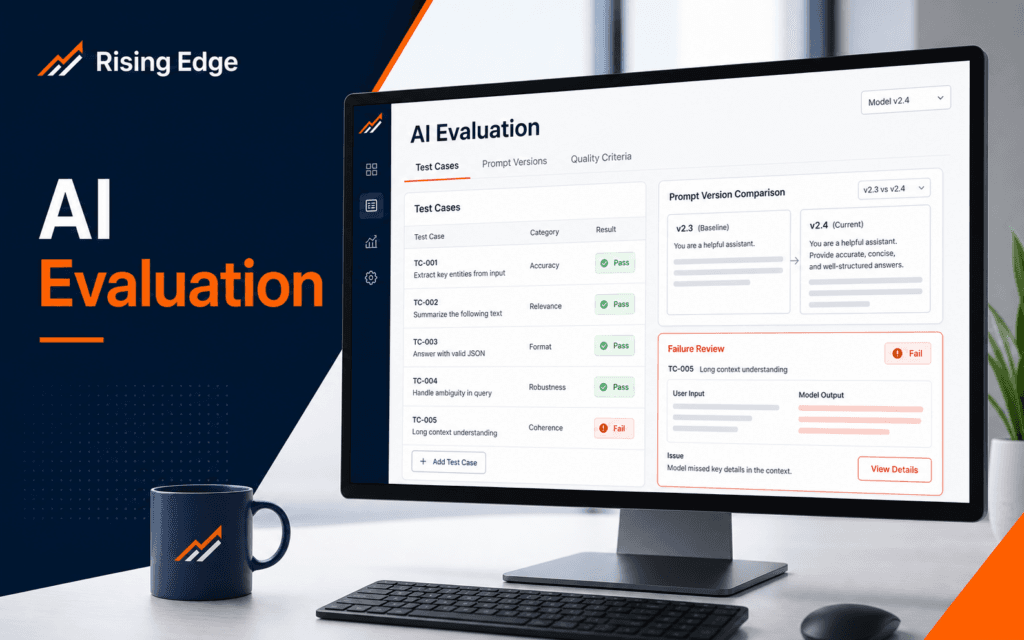
An AI evaluation checklist helps beginners move from guessing to testing. The practical workflow is to define the task, write clear success criteria, collect realistic test cases, run the prompt or model output against those cases, review failures, revise one thing at a time, and keep a record of what changed. Use this checklist to diagnose and resolve the problem when an AI workflow works in one demo but behaves unevenly in real use.
OpenAI documentation describes evaluations, often called evals, as tests for model outputs against style and content criteria that a team specifies. That idea is useful even before a learner builds a formal evaluation system. A small checklist can make AI work more reliable because it turns vague impressions into observable results.
Define The Task Before Testing
Start with the exact task the AI system should perform. A model can summarize a lesson, classify a support message, rewrite a paragraph, generate a product description, extract fields from an enquiry, or answer a course question. Each task needs its own evaluation because each one has a different definition of success.
Write the task in plain language. For example, the system should turn a course enquiry into a short internal summary with the student’s name, course interest, contact detail, and next action. That sentence is more useful than a broad instruction such as make enquiries easier to handle.
The task statement should also define the user and situation. A beginner student, admissions team member, developer, marketer, and customer support agent may all need different output. If the audience is missing, the evaluation will drift toward personal taste.
The Artificial Intelligence course connects to this habit because AI skill is not only using a tool. It is learning how to define a problem well enough to test whether the tool helped.
Write Success Criteria
Success criteria describe what a good output must do. For a summary task, the output might need to include all required fields, avoid invented details, stay under a certain length, and use a professional tone. For a classification task, the output might need to choose one approved label and give a short reason.
Keep the criteria observable. Helpful is too vague by itself. Includes the student’s selected course, names missing information, and avoids unsupported promises are easier to check.
Include failure criteria too. A response should fail if it invents a price, changes a date, ignores safety instructions, exposes private information, uses a banned tone, or answers outside the approved scope. Failure criteria protect the workflow from outputs that sound polished but create risk.
OpenAI prompt engineering guidance emphasizes clear instructions, context, and iteration. In evaluation work, those same ideas matter because a prompt cannot be improved responsibly unless the team knows what good and bad output look like.
Build Realistic Test Cases
Test cases should reflect the inputs the system will actually receive. If the workflow handles student enquiries, include complete enquiries, incomplete enquiries, vague messages, spelling mistakes, mixed-language messages if relevant, and messages with more than one course interest.
Do not test only the easy example. A single perfect input can make a weak prompt look strong. Add cases that reveal ambiguity: missing phone number, unclear course name, long message, repeated details, or an irrelevant request.
Each test case should include the input and the expected behavior. The expected behavior does not always need a perfect output sentence. Sometimes it is enough to define required checks, such as should ask for missing contact detail and should not guess the course.
Keep the set small at first. Ten good cases are better than fifty casual cases. A beginner can start with three normal cases, three edge cases, two error cases, and two cases that should be refused or escalated.
Run The Evaluation Consistently
When testing, keep the model, prompt, settings, and test cases stable. If too many things change at once, the result becomes hard to interpret. Change one major variable, run the same cases again, and compare results.
Record the output for each test case. Mark pass, fail, or needs review. Add a short reason. The reason is important because it reveals the pattern behind failures. A prompt that misses names has a different problem from a prompt that invents promises.
For manual evaluation, use a simple scorecard. Useful categories include task completion, factual accuracy, instruction following, tone, completeness, safety, and formatting. A scorecard makes review less emotional and more repeatable.
For more advanced work, OpenAI Evals provides a framework for evaluating large language models and systems built with LLMs. Beginners do not need to start there, but they should understand the principle: repeated tests make AI behavior easier to improve.
Review Failures Before Rewriting
Do not rewrite the prompt immediately after one bad output. First, group the failures. Did the model misunderstand the task, miss a field, answer too broadly, ignore formatting, invent details, or struggle with edge cases? The fix depends on the failure.
If the output misses fields, add a required-field checklist. If it writes too much, add a length target and examples. If it invents details, add a strict rule to say unknown when information is missing. If it ignores tone, provide a sample tone that matches the user and context.
Avoid adding a wall of instructions after every failure. Long prompts can become harder to maintain. A better method is to make the task, context, examples, and constraints clearer.
The Prompt Engineering course is relevant here because good prompts are easier to evaluate when they are structured. Role, context, examples, output format, and limits should work together.
Keep A Change Log
A change log shows what changed and why. Record the old prompt version, new prompt version, date, test cases used, pass rate if measured, main failures, and next action. This prevents teams from making the same change repeatedly.
The log also helps when a model or workflow is upgraded. If performance changes, the team can rerun known cases and see whether the change improved the real task or only changed the style.
For student projects, a simple table is enough. Columns can include test case, expected behavior, result, failure reason, prompt change, and retest result. The goal is not bureaucracy. The goal is learning from evidence.
The AI Automation and Agent Development course connects to this because automated workflows need checks before they handle real tasks.
Final AI Evaluation Checklist
Before trusting an AI workflow, confirm the task statement, audience, success criteria, failure criteria, realistic test cases, stable test settings, review scorecard, failure notes, prompt version, and retest result. Publish or automate only after the workflow passes the cases that matter for its actual use.
Also decide what should happen when the AI is uncertain. Some workflows should ask a follow-up question. Some should route to a human. Some should return a short refusal. A reliable workflow includes this path before production.
Common AI Evaluation Mistakes
The first mistake is testing only one example. One example cannot show reliability.
The second mistake is judging by confidence. A confident answer can still be wrong.
The third mistake is changing the prompt, model, and test cases at the same time. That makes the result hard to explain.
The fourth mistake is skipping edge cases. Edge cases are where real workflow problems usually appear.
Turn Evaluation Into A Learning Habit
Evaluation should not happen only at the end of a project. A beginner can use the same habit during practice. When a prompt produces a useful answer, save the prompt, input, output, and reason it worked. When it fails, save the failure reason and the next test. This creates a personal library of examples that teaches judgment faster than casual experimentation.
Use simple labels for recurring failures. Common labels include missing context, wrong format, unsupported claim, vague answer, tone mismatch, privacy risk, and incomplete extraction. After a few practice sessions, patterns become visible. A learner may discover that most failures come from unclear input, not from the model alone.
Evaluation also helps with teamwork. If two people disagree about an AI output, the scorecard gives them something concrete to discuss. Instead of saying this feels wrong, they can point to a criterion such as missing required field or unsupported recommendation. That makes revision calmer and more useful.
For production or client work, keep a human review point. AI evaluation improves reliability, but it does not remove accountability. A person still needs to decide whether the workflow is ready for real users, sensitive data, public publishing, or automated actions.
Keep a small set of unchanged evaluation cases between revisions. New examples test coverage, while stable cases reveal whether an improvement in one prompt has quietly reduced quality somewhere else.
Learners in Gujrat, Punjab, Pakistan can use this checklist as a small practice standard before choosing the Artificial Intelligence (AI). Completing and explaining the work gives a clearer signal of subject fit than course terminology by itself.
FAQ
What is an AI evaluation?
An AI evaluation is a test that checks whether model outputs meet defined task, style, accuracy, and safety criteria.
How many test cases should beginners start with?
Start with around ten focused cases: normal inputs, edge cases, error cases, and cases that should be escalated or refused.
Should every prompt have an evaluation?
Any prompt used repeatedly in study, business, support, marketing, or automation should have at least a small evaluation checklist.
Want to Build Practical Technology Skills?
Explore RisingEdge courses designed to help students learn real skills, build projects, and prepare for career opportunities.