WordPress Custom Post Type Planning: Fields, Templates, SEO
WordPress custom post type planning helps teams decide whether content should stay as posts and pages or become a structured content type with its own fields, templates, archive.

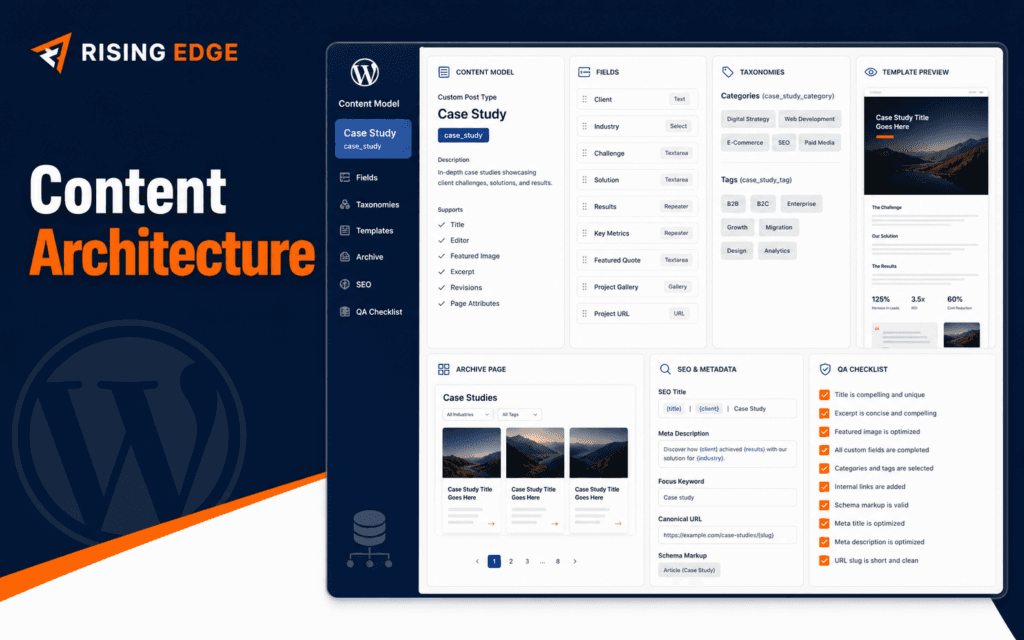
WordPress custom post type planning helps teams decide whether content should stay as posts and pages or become a structured content type with its own fields, templates, archive behavior, and editorial workflow. A custom post type can make a site easier to manage, but only when the content model is clear.
WordPress Developer Resources explains that WordPress supports built-in and custom post types, and register_post_type controls custom post type behavior. That power should be planned carefully because content architecture affects editors, templates, URLs, SEO, and future migrations.
Decide If A Custom Post Type Is Needed
Use a custom post type when the content has a repeated structure, unique fields, unique templates, separate archive needs, or a different editorial workflow. Courses, events, projects, testimonials, services, and team profiles are common examples.
Do not create a custom post type only because the content feels important. If normal posts, pages, categories, blocks, or reusable patterns handle the need clearly, keep the structure simpler.
The WordPress Development course is relevant because students need to understand architecture decisions before writing code.
Make A Justified Choice
A justified choice explains why a custom post type is better than posts, pages, categories, blocks, or a simple landing page. Write the reason before building.
Choose a custom post type when the content has repeated fields, archive needs, filtering, permissions, or template rules that normal pages cannot handle cleanly. Choose normal pages when the content is unique, low-volume, or mostly narrative.
This decision note protects the project from overengineering. It also gives the client, editor, or developer a clear reason for the added structure.
Define The Content Model
Write the content model before development. Include title, slug, summary, body, featured image, custom fields, taxonomy terms, relationships, author, status, and publish date.
For a course post type, fields might include duration, level, modules, instructor, fee note, schedule status, and admission link. For a project post type, fields may include client, industry, services, year, problem, solution, and result.
A clear model prevents random fields from appearing later. It also helps editors understand what information is required.
Separate Fields From Body Content
Custom fields are useful for data that must be reused, filtered, sorted, or displayed consistently. Body content is better for narrative sections that change from page to page.
If the same detail appears in every item, it may deserve a field. If it is part of a story, explanation, or flexible layout, it may belong in the editor body.
This distinction matters for templates, SEO snippets, structured data, and future migrations.
Plan Taxonomies And Relationships
Taxonomies organize content. Use them when editors need to group, filter, or archive items by meaningful labels such as level, topic, location, industry, or service type.
WordPress custom taxonomy documentation explains how taxonomies can organize content beyond default categories and tags. Use that feature when the grouping has long-term value.
Avoid creating a taxonomy for a one-time label. Too many taxonomies make editing harder and archive pages weaker.
Design Templates Before Code
A custom post type usually needs a single template, archive template, related-item section, search behavior, and possibly cards for listing pages. Sketch these before writing registration code.
Template planning should include empty states, long titles, missing images, optional fields, mobile layout, breadcrumbs, and call-to-action placement.
The SEO course connects here because templates affect titles, headings, canonical URLs, internal links, and crawlable archive pages.
Plan URLs And Archives
Decide the URL base carefully. A course post type might use /courses/, while case studies might use /projects/. Changing this later can require redirects and SEO cleanup.
Archive pages should have a purpose. If an archive is public, it needs useful content, filters if needed, internal links, metadata, and a clean layout.
If an archive should not be public, decide that intentionally and document why. Do not leave accidental thin archive pages indexable.
Review Editor Workflow
A content model is successful only if editors can use it. Required fields should be clear, labels should match real language, help text should explain confusing fields, and validation should prevent incomplete publishing.
Think through draft, review, publish, update, and archive states. A post type used by admissions, marketing, or operations may need a different workflow than normal blog posts.
Good editor workflow reduces mistakes and makes the CMS feel trustworthy.
Plan Permissions And Ownership
Some custom post types should be edited only by specific roles. Team profiles, course pages, landing pages, and operational records may need tighter permissions than normal posts.
Write ownership rules: who creates items, who edits fields, who approves publishing, who updates expired information, and who handles redirects if a URL changes.
Permissions are easier to plan before launch than to repair after several people have edited live content inconsistently.
Prepare SEO Metadata
Each item needs a title pattern, meta description guidance, canonical behavior, Open Graph image, and internal linking plan. If the post type uses structured data, decide which fields support it.
Do not generate metadata blindly from fields. A good meta description should summarize the useful promise of the page, not only repeat field names.
Use internal links from relevant pages so the new content type is discoverable and connected to the rest of the site.
Test Before Migration
If existing content is moving into the new post type, create a migration plan. Map old URLs, fields, images, categories, authors, publish dates, metadata, and redirects.
Test a small batch before moving everything. Check the editor screen, public template, archive, search, sitemap, metadata, images, and mobile layout.
The Shopify Development course is a useful comparison point because structured product content also depends on fields, templates, taxonomies, and checkout or conversion paths.
Check Search And Filters
Decide whether the custom post type should appear in site search, filtered listing pages, related-content blocks, and navigation. A course post type may need search visibility, while an internal record type may not.
If filters are public, test them with realistic combinations. Empty results, long taxonomy names, mobile controls, and reset behavior all affect user experience.
Search and filters should help users narrow decisions. If they create confusion, simplify the taxonomy model before launch.
Watch Performance
Custom fields, relationship queries, and archive filters can slow pages when they are designed casually. Plan which fields need to be queried and which can remain display-only.
Avoid building expensive listing pages before understanding content volume. Ten items and ten thousand items require different decisions around pagination, caching, indexing, and query structure.
Performance is part of content architecture because slow templates reduce user trust and can make editing harder.
Plan Blocks And Editor Experience
Modern WordPress sites often combine custom post types with blocks, patterns, and template parts. Decide which content belongs in locked fields and which content editors can arrange with blocks.
Too much flexibility can break consistency. Too little flexibility can force editors to request developer changes for simple content needs.
A good editor experience gives structure where consistency matters and flexibility where storytelling matters.
Create Governance Rules
Every custom post type needs governance. Decide naming rules, required fields, review frequency, expired-content handling, image standards, taxonomy ownership, and deletion policy.
Without governance, structured content slowly becomes inconsistent. Editors may use different labels, skip fields, upload weak images, or create duplicate items.
A short governance note keeps the post type healthy after the developer has finished the first build.
Document Developer Decisions
Before launch, document the registration name, public labels, supported editor features, rewrite slug, archive setting, taxonomies, field names, template files, and SEO behavior.
This documentation helps future developers understand the intent behind the structure. It also helps editors know which fields are required and which details can be changed safely.
If the site changes theme, plugin stack, or hosting setup later, these notes reduce migration risk because the content model is no longer hidden in memory.
Avoid Common Planning Mistakes
Do not create a post type without sample content. Sample items reveal whether fields, templates, cards, archive pages, and metadata actually work.
Do not use custom fields for everything. Over-structured content becomes slow to edit and hard to write naturally.
Do not ignore redirects when changing URLs. A clean content model still needs a clean transition from old paths to new paths.
Create A QA Checklist
Before launch, verify registration settings, labels, supports, rewrite rules, archive behavior, templates, fields, taxonomies, editor permissions, metadata, sitemap inclusion, and redirects.
Also test edge cases: missing optional field, long title, no featured image, draft item, private item, deleted taxonomy term, and mobile card layout.
A custom post type should not launch because one sample page looks good. It should launch when the structure works across realistic content.
Final Planning Order
Use this order: purpose, content model, fields, taxonomies, templates, URLs, archive behavior, editor workflow, permissions, SEO, migration, QA, and launch notes.
Custom post types are powerful when they make repeated content easier to manage and easier to present. They become risky when they are created before the content structure is understood.
Students considering the WordPress Development can practise the practical approach in this article from Gujrat or through live online classes across Pakistan. This makes the course decision more concrete because the learner can evaluate the subject through an actual workflow instead of a broad description.
FAQ
What is a WordPress custom post type?
It is a custom content type registered in WordPress for content that needs its own structure, fields, templates, archive behavior, or workflow.
When should I use a custom post type?
Use one when repeated content has consistent fields, unique templates, filtering needs, different permissions, or a separate archive from normal posts and pages.
What should be planned before building a custom post type?
Plan the content model, fields, taxonomies, templates, URLs, archive behavior, editor workflow, permissions, SEO metadata, migration, and QA checks.
Want to Build Practical Technology Skills?
Explore RisingEdge courses designed to help students learn real skills, build projects, and prepare for career opportunities.