SEO Internal Linking Checklist: Crawlable Links and Clear Anchors
An SEO internal linking checklist helps search engines and readers understand how pages connect. The practical checklist is to use crawlable links, write clear anchor text, connect.

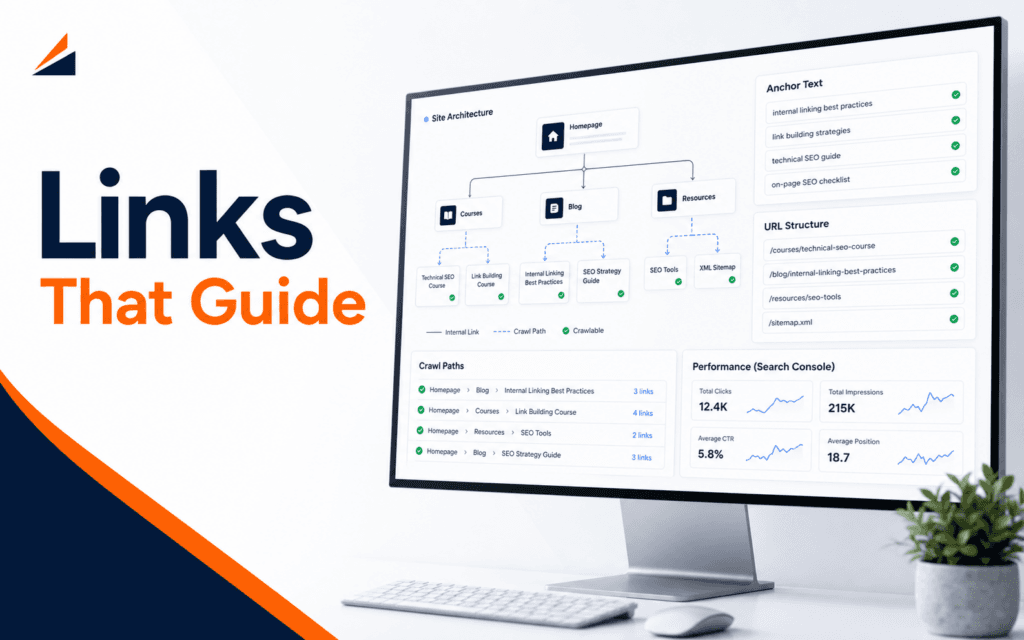
An SEO internal linking checklist helps search engines and readers understand how pages connect. The practical checklist is to use crawlable links, write clear anchor text, connect related pages naturally, support important pages from relevant articles, avoid link clutter, and review results in Search Console. Internal linking is not about adding as many links as possible. It is about making the site easier to understand.
Google’s SEO Starter Guide explains that SEO helps search engines understand content and helps users decide whether to visit a site from search. Internal links support that goal because they show relationships between pages and help readers continue their task.
Use Crawlable Links
Google link guidance explains that links help search systems find pages and understand relevance. The first rule is that important internal links should be crawlable. A normal HTML link with a clear destination is usually safer than hiding important navigation behind scripts, buttons without links, or elements that do not expose a real URL.
For beginners, the test is simple. If the link points to an important course page, service page, blog article, or category page, it should work as a real link. The destination should load, the URL should be clean, and the link should make sense in context.
Avoid relying only on search boxes, filters, or interactive widgets to expose important pages. Those features can help users, but important pages also need direct paths from menus, page sections, related articles, or category hubs.
The work begins with site structure. A visitor should be able to move from a broad page to a specific page and from a specific page to related next steps. Search engines benefit from that same clarity.
Write Anchor Text That Explains The Destination
Anchor text is the visible text of a link. Search guidance recommends useful anchor text so people and search systems can make sense of the linked page. This means the link text should describe the destination, not rely on vague labels such as read more.
For example, a sentence about search basics can link to the SEO course using a natural phrase. A sentence about layout and mobile readability can link to the Web Design course. The anchor should fit the sentence and set the right expectation.
Avoid over-optimizing anchor text by repeating the same exact keyword everywhere. Natural variation is better for readers and safer editorially. Use course names, topic names, and descriptive phrases that match the destination.
A good internal link should still make sense if a reader reads only the sentence around it. If the link feels forced, remove it or move it to a more relevant section.
Link From Context, Not From Habit
Internal links work best when they appear where the reader needs them. A beginner article about meta descriptions can link to an SEO course when the article discusses search learning. A WordPress article can link to WordPress development when the reader needs practical implementation. A design article can link to web design or graphic design when the sentence genuinely supports that next step.
Avoid adding every course link to every article. That makes the page feel promotional and weakens the value of each link. A focused article usually needs a small number of strong internal links, not a catalog.
Think of internal links as bridges. Each bridge should connect two related ideas. If the article discusses campaign tracking, a link to digital marketing may be useful. If the article discusses responsive layout, web design is relevant. If the article discusses AI content verification, AI content generation is relevant.
This is why a link checklist should include purpose. Before adding a link, name why the reader would benefit from that destination.
Support Important Pages Without Overloading Them
Important pages should receive links from relevant supporting content. Course pages, admissions pages, contact pages, and cornerstone guides need discoverable paths. But support should be distributed naturally.
Start with pages that already receive related traffic. If an article about beginner SEO explains internal links, it can support the SEO course or a related guide. If a course page has supporting blog posts, link back from those posts when the context fits. This creates a learning path.
Repeating the same link in every paragraph creates clutter. Link clutter can distract readers and make the page feel less trustworthy. It can also make the main action harder to see. A few relevant links are better than many weak links.
For a site like Rising Edge, internal linking should help students move from a learning problem to the right course or next article. It should not interrupt the article with repeated promotion.
Check URLs And Site Structure
Google’s URL structure guidance recommends crawlable URL structures for effective crawling. For beginners, this means URLs should be stable, readable, and not need unnecessary parameters for important pages. A clean blog URL or course URL is easier to share and understand.
Before publishing, open every internal link. Confirm that the page returns correctly, uses the public domain, and does not point to an admin or staging URL. Check that the link does not redirect through an avoidable chain. If a page moved, update the link to the final destination.
Menus and breadcrumbs matter too. Internal links inside articles are useful, but the main structure should also help people move through the site. Navigation, category pages, related posts, and course pages should reinforce each other.
Students learning SEO should treat links as part of information architecture. The SEO course connects these ideas with search intent, page structure, and measurement.
Review Links In Search Console
Search Console can help site owners inspect URLs, submit sitemaps, and review search visibility issues. It should not be used as a guessing machine, but it is useful for checking whether important pages are discoverable and whether search visibility is improving.
After publishing or updating internal links, give search systems time to process changes. Then review page performance, queries, and indexing signals. If an important page receives impressions for a topic, related internal links may help users and search engines understand the topic path more clearly.
Ranking changes rarely come from one internal link alone. Internal links are one part of SEO. Content usefulness, page quality, technical access, search intent, and overall site structure also matter.
The practical habit is to review links during content updates. When a new article is published, ask which existing articles should link to it and which pages it should support. This keeps the site connected over time.
Common Internal Linking Mistakes
The first mistake is using vague anchors. Labels such as learn more and this page do not explain the destination well. Use descriptive anchors instead.
The second mistake is linking only to the homepage. The homepage is important, but internal links should also support specific course pages, category pages, and relevant articles.
The third mistake is adding too many links. A page full of links can feel unfocused. Link where it helps the reader continue the task.
The fourth mistake is leaving old links untouched. When URLs change, old internal links should be updated. Broken or redirected links create friction for users and maintenance problems for the site.
Final SEO Internal Linking Checklist
Before publishing, confirm that every important internal link is crawlable, uses a public URL, has descriptive anchor text, points to a relevant destination, and appears in a useful context. Check that the article supports one or two priority pages naturally. Remove forced links. Open each link. Review Search Console after the page has time to be discovered.
Internal linking is a small habit with compounding value. It helps readers move through the site, helps important pages become easier to find, and gives search engines clearer context about how the site is organized.
For a training website, internal links should also support learning paths. A beginner may start with a blog checklist, move to a course page, compare related skills, and then contact admissions. That journey should feel natural. Links should appear where the reader is already thinking about the next step, not only at the end of the article.
Make link review part of every content update. When a new blog post goes live, identify two older pages that should point to it and two priority pages the new post should support. This small routine keeps the site from becoming a set of disconnected posts and turns the blog into a structured learning resource.
After publishing a link change, inspect the rendered page as well as the editor. Confirm that the anchor is crawlable HTML, the destination returns a successful status, and the surrounding sentence still explains why the link is useful.
For technology learners based in Gujrat, Punjab, Pakistan, this checklist shows one kind of evidence worth building through the Search Engine Optimization (SEO). The focus should remain on defensible decisions and finished work rather than attendance or software familiarity.
FAQ
What is internal linking in SEO?
Internal linking means linking from one page on your site to another page on the same site. It helps readers navigate and helps search engines understand page relationships.
How many internal links should a blog post have?
Use as many as are genuinely helpful, but avoid clutter. A focused article often needs a few strong contextual links rather than many weak links.
What makes anchor text good?
Good anchor text clearly describes the destination page, fits naturally in the sentence, and avoids vague labels such as read more.
Want to Build Practical Technology Skills?
Explore RisingEdge courses designed to help students learn real skills, build projects, and prepare for career opportunities.