Multi-Location Inventory Drift Recovery: Events, Reconciliation.
multi-location inventory drift recovery is the process of comparing an app’s inventory state with Shopify’s authoritative state, explaining discrepancies, and applying bounded.

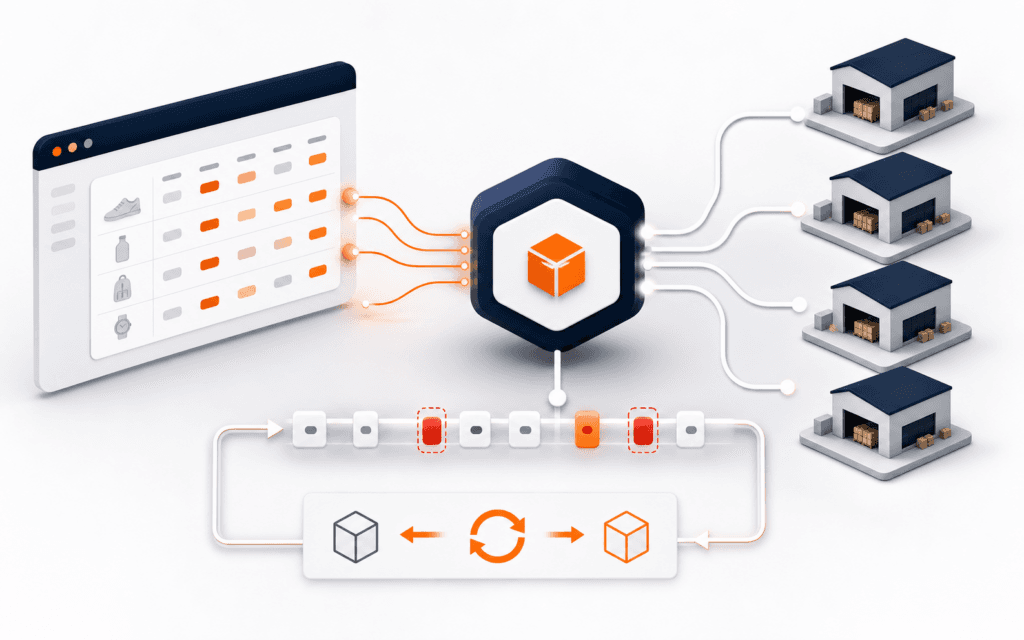
multi-location inventory drift recovery is the process of comparing an app’s inventory state with Shopify’s authoritative state, explaining discrepancies, and applying bounded corrections. Webhooks provide timely change signals, but they are not a guaranteed ordered ledger. A reliable integration verifies deliveries, deduplicates attempts, processes changes idempotently, records per-resource state, and periodically reconciles through the Admin API.
Start in a development store with generated or synthetic products, locations, and inventory. Preserve the failing delivery IDs, timestamps, topics, API versions, affected inventory item and location, application release, and current Shopify values before changing code. Never test recovery by editing a live merchant’s stock without explicit authorization and rollback.
Define The Inventory Contract
Document which system owns each quantity, which Shopify locations are in scope, which states the app stores, and which direction changes flow. Distinguish available, on-hand, committed, reserved, incoming, and application-specific concepts instead of calling every number stock.
Write the allowed delay, conflict rule, correction owner, and manual override behavior. A two-way integration needs a loop-prevention design so its own correction does not trigger an endless counter-update.
Identify The Resource Keys
Use stable Shopify identifiers for shop, location, inventory item, variant, and delivery. Inventory is not only a product or SKU; one inventory item can have levels at several locations. A SKU may be missing, duplicated, or changed and should not be the sole database key.
Log safe identifiers and relationships, not customer data or credentials. Verify that the failing payload maps to the same shop and location row the reconciliation query later reads.
Verify Subscription Scope
Inspect the declared topic, endpoint, filters, included fields, API version, and access scopes. Confirm the subscription exists for the affected shop and environment. A valid endpoint cannot receive a topic that was never registered or was removed during app configuration changes.
Record subscription creation and update results. Compare development and production configuration without copying credentials. When several subscriptions match the same merchant action, correlate them without assuming their delivery IDs will match.
Verify The Raw Delivery
Validate Shopify’s HMAC against the exact raw request body before parsing or transforming it. Reject unverifiable requests and avoid logging secrets or full sensitive payloads. Preserve the delivery ID, triggered timestamp, topic, shop domain identifier, and API version for safe diagnosis.
Return a success response only after the application has durably accepted the event under its architecture. If processing is asynchronous, persist the verified envelope before acknowledging it so a process crash does not create a silent gap.
Deduplicate Delivery Attempts
Shopify documents that a delivery may arrive more than once. Store the webhook delivery ID with a uniqueness constraint and process with idempotent operations. A duplicate should return success without repeating inventory side effects, notifications, or downstream jobs.
Do not mark the ID completed before its durable work is committed. Track received, processing, applied, failed, and ignored states so a crash can be distinguished from a legitimate duplicate.
Handle Out-Of-Order Events
Shopify does not guarantee ordering within or across topics. Compare the event’s resource update time or a trustworthy version signal with the last applied state for that inventory level. Ignore stale transitions while preserving them in the audit record.
Do not rely on arrival time alone. Queue delay, retry, and network conditions can make an older change arrive later. When the payload lacks enough state to decide safely, fetch the current authoritative resource instead of guessing.
Separate Receipt From Application
Use one layer to authenticate and persist the event and another to apply business state. This keeps a slow database, ERP, or notification call from delaying the webhook response. Assign a correlation ID that follows the event through queue, worker, state update, and reconciliation.
Bound retries and route persistent failures to a dead-letter or review state. A retry should execute the same idempotent transition, not create a second logical adjustment.
Inspect Transaction Boundaries
Update the delivery record and local inventory state in a transaction when they must succeed together. If an external system is involved, use an outbox or explicit pending state rather than pretending one database transaction covers the network.
Simulate a crash after receipt, after state write, and before downstream acknowledgement. Recovery should resume from recorded state without applying the quantity twice.
Build A Reconciliation Cursor
Schedule an Admin API query for inventory resources updated since a durable cursor, with a small overlap to protect timestamp boundaries. Advance the cursor only after the fetched page and its continuation are stored or applied successfully.
Account for pagination, API limits, shop time interpretation, and deleted or disconnected resources. Shopify recommends reconciliation because webhook delivery can be missed or mishandled; the job is a normal control, not only an incident script.
Compare At The Right Grain
Compare by shop, inventory item, location, and relevant quantity name. Aggregate product totals can hide one location being high while another is low. Preserve both authoritative and local timestamps, values, and source of the last transition.
Classify each discrepancy as missing local row, stale local row, unexpected local row, mapping error, unsupported location, failed side effect, or ambiguous conflict. Classification directs recovery and prevents bulk overwrites.
Protect Merchant Overrides
Identify edits made intentionally in Shopify or an approved external inventory system. Do not automatically reverse them because the app has an older value. Apply the documented ownership and conflict rule, then ask for review when evidence cannot identify the authority.
Show the reviewer the item, location, both values, timestamps, recent transitions, and proposed correction. Never expose access tokens or unrelated store data in the review screen.
Design Bounded Replay
Replay only verified stored deliveries whose status and version make them eligible. Filter by shop, time range, topic, and resource, require a dry-run discrepancy report, and cap the number of side effects. Record the operator and replay batch.
A replay is unsafe when old events would overwrite newer authoritative state. Prefer reconciliation to current Shopify values when event order or completeness is uncertain.
Test Drift Scenarios
Create cases for duplicate delivery, out-of-order update, worker timeout, database rollback, missing subscription, changed location mapping, API rate limit, deleted item, and reconciliation overlap. Verify final state and audit records, not only HTTP responses.
Use the general webhook automation checklist for verification and retry controls, then add Shopify-specific inventory relationships and API behavior.
Monitor Sync Health
Track delivery verification failures, queue age, processing failures, duplicates, stale events, reconciliation duration, discrepancy counts, corrected rows, and unresolved conflicts. Alert on sustained patterns rather than one harmless duplicate.
Keep metric definitions stable and segment by shop and integration version without exposing merchant-sensitive values. A green endpoint uptime chart does not prove inventory consistency.
Handle API Version Changes
Record the webhook and Admin API version used by each subscription and worker. Review Shopify release notes and test payload and schema assumptions before supported-version changes. A field rename, quantity model change, or scope change can break mapping while deliveries still return successful HTTP responses.
Run contract tests against representative payload fixtures and current development-store queries. Deploy version support deliberately and preserve evidence showing which worker handled each event.
Protect Against Cross-Shop Mixing
Bind every verified delivery to the authenticated shop installation and resolve credentials from that trusted installation record. Never accept a shop identifier from model output or an unverified request as authority for a database partition or Admin API call.
Test two stores with overlapping SKUs and inventory values. A worker must not read, write, reconcile, or log one shop’s state under another shop, even after retries or queue redelivery.
Reconcile Deletes And Disconnects
Define how the app handles removed locations, disconnected inventory items, uninstalled apps, and revoked scopes. A missing resource is not always an API outage. Mark tombstones or inactive relationships so reconciliation does not recreate obsolete rows indefinitely.
When app uninstallation or privacy topics require cleanup, follow current Shopify requirements and retain only records permitted by policy. Separate operational inventory recovery from customer-data handling.
Write An Incident Runbook
Document how to pause consumers, identify affected shops and time ranges, preserve evidence, run a dry reconciliation, approve corrections, monitor recovery, and communicate limitations. Include contacts, required roles, query templates, stop conditions, and credential revocation routes.
After recovery, record root cause at the correct layer: subscription, verification, queue, mapping, transaction, external system, reconciliation, or operator action. Add a regression case before closing the incident.
Release And Roll Back
Deploy changes first to a development store and replay synthetic cases. In production, use a small authorized cohort, monitor discrepancies, and preserve the previous worker and mapping configuration. Pause side effects when uncertainty rises.
A Shopify Development course can provide guided platform practice. Production inventory still needs merchant authorization, current Shopify documentation, controlled credentials, reconciliation, and an incident owner.
In Gujrat, Punjab, Pakistan, prospective learners can apply the practical approach in this article when discussing the Shopify Development with an admissions adviser. Questions should stay tied to current exercises, review methods, prerequisites, and project evidence.
FAQ
Are Shopify webhooks guaranteed to arrive in order?
No. Shopify documents that ordering is not guaranteed. Use event timestamps or current resource fetches and reject stale transitions.
Why reconcile if webhook handling succeeds?
Deliveries can be missed or mishandled, and downstream processing can fail. Reconciliation compares the app with Shopify’s current authoritative state.
Can I deduplicate Shopify inventory webhooks by SKU?
No. Use delivery IDs for attempts and stable shop, inventory-item, and location identifiers for state. SKUs can be absent or changed.
Want to Build Practical Technology Skills?
Explore RisingEdge courses designed to help students learn real skills, build projects, and prepare for career opportunities.