Metadata For Google Search: Titles, Snippets, Images
Metadata for Google Search should help search engines understand a page and help people decide whether the result is worth opening. A practical metadata workflow covers the page.

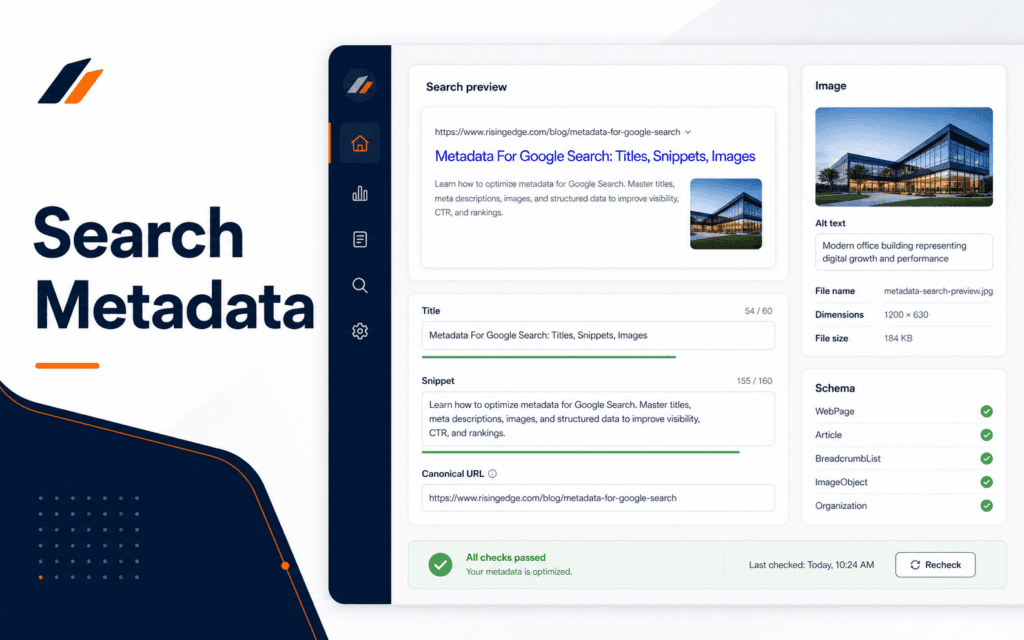
Metadata for Google Search should help search engines understand a page and help people decide whether the result is worth opening. A practical metadata workflow covers the page title, title link signals, meta description, image filename, image alt text, structured data, canonical URL, and final read-back after publishing. Use this checklist to diagnose and resolve the problem when a page is useful but its search appearance is unclear, inconsistent, or incomplete.
Google’s SEO Starter Guide explains that SEO is about helping search engines understand content and helping users find a site through search. Metadata is one part of that work. It cannot rescue thin content, but it can make strong content easier to interpret, preview, and maintain.
Start With The Page Purpose
Before writing metadata, define the page purpose in one sentence. A course page, blog article, contact page, landing page, service page, and product page should not use the same title pattern or description style. The metadata should reflect the page’s job.
Blog articles usually answer a practical question. Course pages help a student understand what they will learn and whether the course fits their goal. Contact pages help a visitor take action.
This first step prevents generic titles. If the page purpose is clear, the title and description become easier to write. If the purpose is vague, metadata usually becomes stuffed with broad keywords.
The SEO course connects to this workflow because metadata is not only a technical field. It is a communication decision tied to search intent, page quality, and user trust.
Write A Clear Page Title
The page title should identify the main topic and make the page distinct from other pages on the same site. It should be specific enough that a user can understand the result before clicking.
Title link guidance from Google explains that Google uses several sources to determine title links in search results, while publishers can indicate preferences through best practices. The practical lesson is to write a strong title element, align it with the visible page heading, and avoid confusing title patterns.
Do not use the same title across many pages. Do not lead with a long brand phrase on every article if it hides the actual topic. Do not stuff multiple keywords into a title that reads unnaturally.
A useful title pattern is topic first, then context if needed. For example, Metadata For Google Search: Titles, Snippets, Images is clearer than SEO Checklist Complete Guide Best Tips. The first version signals the exact scope.
Write A Useful Meta Description
Meta description guidance from Google says a meta description tag generally informs and interests users with a short, relevant summary of what a page is about. Treat the description like a compact page promise, not a list of keywords.
A good meta description explains the reader problem, page value, or specific workflow. It should match the page content. If the description promises a checklist, the page should include a checklist. If it promises beginner guidance, the page should be readable for beginners.
Avoid duplicated descriptions across pages. Duplicates make the site harder to manage and can make search results feel less specific. Also avoid descriptions that are only slogans. Learn. Build. Lead. works as a brand tagline, but a search description needs to summarize the page.
Keep descriptions concise enough for search previews, but do not obsess over a fixed character count. Google may generate a different snippet when it believes another part of the page better matches a query. The publisher’s job is to provide a useful candidate description.
Prepare Image Metadata
Images can support search appearance and accessibility. Google image guidance recommends descriptive filenames, titles, and alt text where possible. The image should also sit near relevant text and match the page subject.
Start with the filename. A file named metadata-google-search-checklist.png is easier to understand than image-final-new.png. Use lowercase words separated by hyphens. Avoid vague names, spaces, and random export numbers in final files.
Alt text should describe the meaningful content of the image. If a featured image shows a search results dashboard with title, snippet, and image checks, say that clearly. Do not stuff keywords into alt text. Do not describe decorative graphics as if they contain information.
Image titles and captions should be used when they help the page. A blog featured image may not need a visible caption, but it still needs a useful media title and alt text in the publishing system.
The Web Design course is relevant here because image preparation also affects layout, performance, accessibility, and responsive presentation.
Check Structured Data Carefully
Structured data can help Google understand page content and may make pages eligible for rich results when requirements are met. It should describe what is really on the page. Do not add schema types that the page does not support.
Standard articles may use BlogPosting or Article schema when the page content supports it. FAQPage schema should only be used when the page includes visible FAQ content that follows the required structure. Product or review schema should not be added to ordinary articles unless the page genuinely contains eligible product or review information.
The most common structured data mistake is adding more markup than the content can justify. More schema is not automatically better. Complete and accurate markup is safer than broad, inaccurate markup.
Use Google’s own structured data documentation for the type you plan to use. Check required and recommended properties before publishing. If the site uses a plugin, still read back the saved fields to confirm they were stored as expected.
Keep Canonicals And Slugs Consistent
The slug, canonical URL, internal links, and published URL should point to the same intended page. If the slug changes during publishing, update the canonical and read back the final URL. A mismatch can confuse maintenance, reporting, and internal linking.
Use short descriptive slugs. Avoid dates unless the date is part of the topic. Avoid changing slugs after a page has been indexed unless there is a redirect plan.
Internal links should use natural anchor text. A page about metadata can link to an SEO course when the learning path is relevant. It should not force a course link into every paragraph.
The Digital Marketing course connects to this step because metadata affects campaign landing pages, search previews, and reporting clarity.
Final Metadata QA Checklist
Before publishing, check the page purpose, title, visible H1, meta description, slug, canonical URL, excerpt, category, tags, image filename, image alt text, schema type, internal links, and final preview. Confirm that no field contains a placeholder.
After publishing, use a read-back check. Confirm the CMS saved the title, slug, content, featured image, metadata, and Rank Math fields if the workflow uses Rank Math. The read-back matters because a form can appear submitted while one field silently fails.
Also check the public page. Open the final URL, confirm it is not a 404, and review the page on desktop and mobile. Metadata is part of publishing, but the public page still has to work.
Maintain A Metadata Map
A small site can track metadata in a simple spreadsheet or content database. The map should include page URL, page type, title, meta description, canonical URL, primary keyword, category, featured image filename, alt text, schema type, and last review date. This makes duplicate titles and missing descriptions easier to find.
The map is useful during redesigns, migrations, and blog production. If a page is moved, the slug and canonical can be reviewed in one place. If a course page is updated, the title and description can be checked against the new page content. If a blog article is revised, the image alt text and schema can be reviewed at the same time.
Do not turn the map into busywork. Track the fields that affect publishing quality and maintenance. A short, accurate metadata map is better than a large sheet nobody trusts.
For teams, assign ownership. A writer may draft the title and description. An SEO reviewer may approve the keyword and canonical. A publisher may verify that WordPress or the site framework saved the fields correctly. Clear ownership prevents metadata from being skipped at the end of the workflow.
Common Metadata Mistakes
The first mistake is writing metadata before understanding the page. This creates generic titles and weak descriptions.
The second mistake is copying the same meta description across many pages. Each important page needs its own summary.
The third mistake is treating image alt text as a keyword field. Alt text should describe the image in context.
The fourth mistake is adding schema because it sounds advanced. Schema should match the visible page content and eligibility rules.
Students considering technology training in Gujrat, Punjab, Pakistan can use the practical approach in this article to judge the practical depth of the Search Engine Optimization (SEO). The useful evidence is the work a learner can explain, test, and improve, not a list of tools alone.
FAQ
Does Google always use my meta description?
No. Google may generate a different snippet when another part of the page better matches the search query.
Should every page have the same title format?
No. A consistent site style is useful, but each page title should still describe the specific page.
What should be checked after publishing?
Check the public URL, title, slug, meta description, canonical URL, featured image, alt text, schema, and saved SEO plugin fields.
Want to Build Practical Technology Skills?
Explore RisingEdge courses designed to help students learn real skills, build projects, and prepare for career opportunities.