AI Privacy Review: PII, Consent, Retention
An AI privacy review helps teams decide whether a dataset, prompt workflow, or automation is handling personal information responsibly. The practical sequence is to identify.

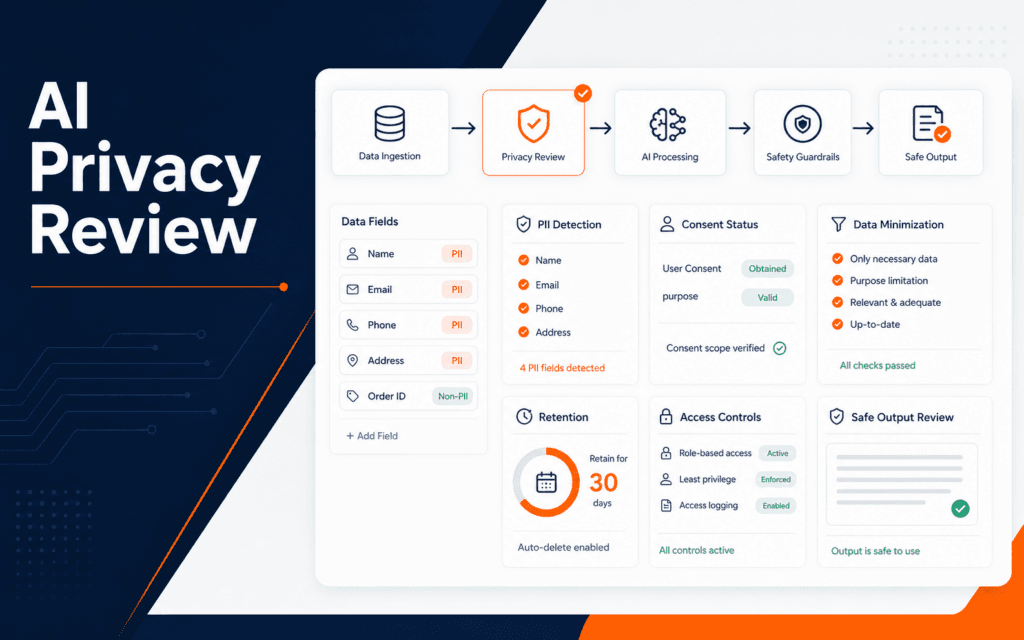
An AI privacy review helps teams decide whether a dataset, prompt workflow, or automation is handling personal information responsibly. The practical sequence is to identify personal data, confirm why it is needed, check consent or lawful basis, reduce unnecessary fields, control access, set retention limits, review outputs, and document the remaining risk. This matters even for beginner AI projects because copied student records, chat transcripts, form enquiries, and customer messages can contain private details.
NIST says its AI Risk Management Framework is designed to help manage AI risks to individuals, organizations, and society. NIST also describes its Privacy Framework as a tool for identifying and managing privacy risk. Put together, those sources point to a simple habit: before using data in an AI workflow, ask what privacy risk the workflow creates and how much data is truly needed.
Identify Personal Information
Start by listing the data fields that enter the AI workflow. Names, phone numbers, email addresses, addresses, CNIC or national ID values, payment details, student records, photos, voice recordings, chat messages, and device identifiers can all create privacy risk. Some fields are obviously personal. Others become personal when combined.
Do not only inspect the final spreadsheet. Look at forms, exports, screenshots, pasted prompts, uploaded files, logs, and model outputs. Privacy exposure often happens when someone copies more context than the task requires.
For a class project, the review can be simple. Create a table with field name, source, purpose, sensitivity, where it is stored, who can access it, and whether it can be removed. The table makes hidden assumptions visible.
The Artificial Intelligence course connects to this because useful AI work starts with responsible data thinking, not only model behavior.
Confirm The Purpose
Every personal data field should have a clear purpose. If a workflow classifies course enquiries, it may need the message text and selected course. It usually does not need a student’s full phone number in the prompt. If a workflow summarizes feedback, it may need the complaint category but not the student’s identity.
Write the purpose in plain language. Avoid vague reasons such as “for AI” or “for analysis.” A better reason is “to route the enquiry to the correct course adviser” or “to detect whether the message asks about fees, timing, or admission.”
When the purpose is unclear, pause before processing the data. Privacy risk grows when teams collect data first and invent the use later. A purpose statement also helps reviewers decide whether an output is appropriate.
Check Consent And Expectations
Consent is not a decoration on a form. A person should understand what they are giving, why it is collected, and how it may be used. When data comes from existing records, check whether the intended AI use matches the original expectation.
For beginner work, avoid using real personal data unless there is a clear reason and permission. Use synthetic examples, anonymized samples, or shortened records when possible. Practice does not need to expose real people.
For data from public comments, emails, WhatsApp messages, or admissions forms, treat the source carefully. Publicly visible does not always mean appropriate for AI processing. The context of collection still matters.
Minimize The Data
Data minimization means using only what the task needs. Remove fields that do not improve the decision or explanation. Mask names, phone numbers, addresses, and account numbers when identity is not required.
This is one of the fastest ways to reduce risk. A prompt that says “student asked about evening web design classes” is usually safer than a prompt containing the student’s name, phone number, email, and full conversation history.
Minimization also helps quality. Smaller, cleaner inputs make it easier to review whether the model is responding to the relevant facts instead of being distracted by private or noisy details.
Students working with the AI Content Generation course can apply the same idea before asking tools to rewrite, summarize, or classify real messages.
Control Access And Storage
Decide where the data lives and who can access it. A private spreadsheet shared with the whole team, a prompt copied into multiple tools, or a log file full of raw messages can create more exposure than the model itself.
Access should match the job. A reviewer may need anonymized examples. A developer may need error codes and safe samples. A course adviser may need contact details. Those are different access needs.
Also inspect generated outputs. An AI summary can repeat private details from the input. If summaries are stored, emailed, or posted into another system, they need the same review as the source data.
Set Retention Limits
Retention answers how long the data should be kept. Keeping everything forever is easy, but it creates avoidable risk. A practice dataset, test prompt, or temporary review export should have a cleanup date.
Write a retention note for each workflow: what is stored, where it is stored, how long it stays, who owns cleanup, and how deletion will be confirmed. The note does not have to be complex, but it must be real enough to follow.
For workflows that feed automation, also review queues and logs. Personal data can remain in failed jobs, retries, debug exports, and screenshots long after the visible project looks clean.
Review Outputs Before Sharing
AI outputs need privacy review too. A model may include a name in a summary, infer sensitive details, or combine fields in a way that reveals more than expected. Before sharing an output, check whether it contains unnecessary identity details.
For public content, remove personal references unless explicit permission and editorial need exist. For internal workflows, restrict outputs to the smallest useful audience. For training examples, keep private details out of screenshots and demonstrations.
The Prompt Engineering course is relevant because prompt instructions can require anonymization, structured outputs, and privacy-safe summaries.
Review Third-Party Tools
Many AI workflows use more than one tool. A student may collect data in a form, export it to a spreadsheet, paste it into an AI assistant, send the result to email, and store the summary in another app. Each transfer creates a new privacy question.
List every tool in the path. For each one, record what data is sent, whether the tool stores inputs, who can access the workspace, and whether the output moves somewhere else. This does not require legal language for a class project, but it does require honest mapping.
Be careful with browser extensions, shared chats, public templates, and screenshots. These can expose private data even when the main dataset looks controlled.
Create Safe Practice Examples
Beginners learn faster when they can practice without handling real private records. Create synthetic examples that preserve the shape of the problem without copying real identities. For example, use a fictional course enquiry instead of a real student’s message.
If a real example is necessary, redact it before training or demonstration. Replace names, phone numbers, emails, addresses, and identifiers with neutral labels. Then check whether the remaining text still reveals the person through context.
Safe examples also make teaching easier. Instructors can discuss the AI behavior openly without worrying that a screenshot or sample file exposes someone.
Decide What Requires Human Review
Not every AI output carries the same risk. A private grammar suggestion may need little review. A message that summarizes a student’s complaint, recommends an admissions action, or updates a customer record needs stronger review.
Create simple levels. Low-risk outputs can be used internally. Medium-risk outputs need reviewer approval. High-risk outputs should not be generated or shared until the data handling process is clear. This keeps the review practical instead of treating every workflow as equally dangerous.
The review level should be written before the workflow runs. If a team decides only after seeing the output, convenience may win over privacy.
Keep A Privacy Review Log
Record the review date, data source, purpose, personal fields found, fields removed, access decision, retention rule, output risk, and open questions. A compact log is enough. The point is to make decisions traceable.
When the workflow changes, review the log again. A harmless classification task can become riskier if it starts sending outputs to email, CRM, analytics, or another AI tool.
Final AI Privacy Review
Before using personal data in an AI workflow, confirm the data fields, purpose, consent or expectation, minimization, access controls, storage location, retention rule, output review, and review log. If any item is unclear, fix the workflow before scaling it.
Include deletion and correction in the review plan. Privacy controls are incomplete when data can be collected with consent but cannot be located, corrected, exported, or removed through a documented process.
For technology learners based in Gujrat, Punjab, Pakistan, this checklist shows one kind of evidence worth building through the Artificial Intelligence (AI). The focus should remain on defensible decisions and finished work rather than attendance or software familiarity.
FAQ
What is an AI privacy review?
An AI privacy review is a structured check of how an AI workflow collects, uses, stores, shares, and deletes personal information.
Can beginners use real data in AI practice?
They should avoid real personal data unless there is a clear need, permission, and a safe handling process. Synthetic or anonymized examples are usually better for practice.
Why does retention matter?
Retention limits reduce risk by preventing temporary AI files, logs, prompts, and datasets from staying around longer than needed.
Want to Build Practical Technology Skills?
Explore RisingEdge courses designed to help students learn real skills, build projects, and prepare for career opportunities.